I’ve been considering using WriteHuman AI for writing help but I’m unsure if it’s really worth it. Some reviews seem promotional and I’m worried about quality, accuracy, and hidden costs. Can anyone share real experiences, pros and cons, and whether you’d recommend WriteHuman AI for consistent, human-like content?
WriteHuman AI review, after actually using it
Tried WriteHuman here:
Short version from my own run with it: the marketing talks about being tested against detectors like GPTZero. My results did not match that promise at all.
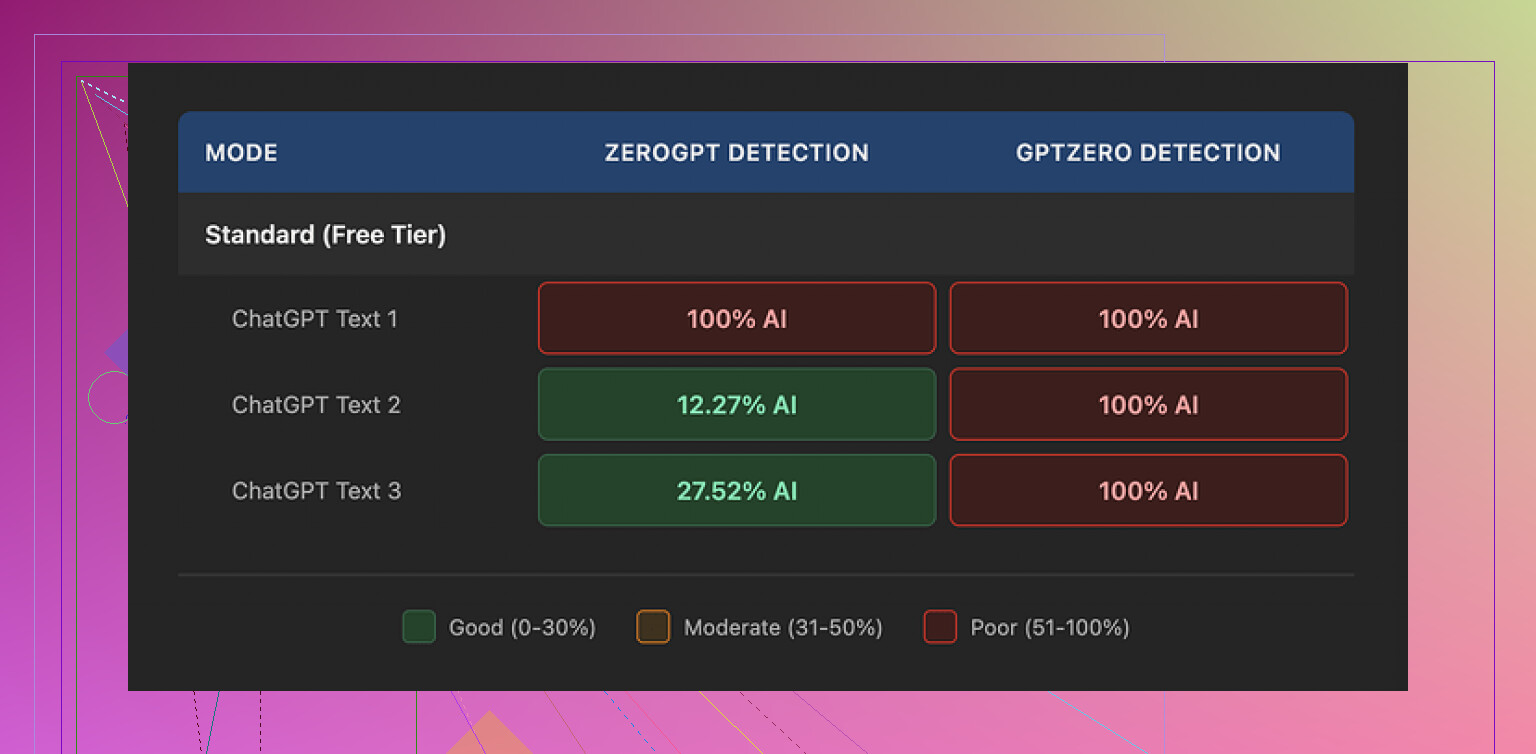
I took three different outputs from WriteHuman and ran each through GPTZero. Every single one came back as 100% AI. No borderline scores, no ambiguity, just full-on AI classification across the board.
Then I threw the same three samples into ZeroGPT. That one gave mixed signals:
• First sample: 100% AI
• Second sample: about 12% AI
• Third sample: roughly 28% AI
So one detector flagged everything, the other wobbled all over the place. If you are trying to stay under a threshold, that inconsistency becomes a problem fast.
Quality of the text
The writing itself looked off in some obvious ways.
In a few paragraphs, the tone snapped from formal to casual mid-sentence. It felt like reading two different writers stitched together. On top of that, one of the outputs had a typo: “shfits” instead of “shifts”.
I get the idea behind this. Some tools try to throw in oddities and mistakes to look more human. In practice, what I saw hurt the usability of the text. You do not want to paste something into a client email or a school assignment and then have to rewrite half of it to sound like one person again.
Here is a sample screenshot from the tests:
Pricing and terms, the part most people skip
Their pricing starts at 12 dollars per month if you pay annually. That Basic tier includes 80 requests per month.
Once you pay, you get:
• Access to an “Enhanced Model”
• More tone options
On paper, those extras might improve output, but I did not see anything that matched the promises about detector evasion.
What bothered me more than the price:
• They state in their own terms they do not guarantee bypass of any detector. So if it fails, that is “working as intended”.
• They have a strict no-refunds policy. If it does not help you, you are stuck.
• Anything you submit is licensed for AI training. If you care about privacy, NDAs, or sensitive documents, this is a hard stop. The only way around it is not using the service at all.
If you think of paying for it, you need to be fine with all three points. If any of them feels off, it is the wrong tool for you.
What worked better for me
When I compared tools side by side, Clever AI Humanizer gave me better results in detector tests and did not put a paywall in front of basic use.
From the runs I did, text passed more consistently and I did not have to fight bizarre tone swings or nonsense typos. For my use, it felt safer to try because there was no upfront cost and no “no-refunds” trap sitting in the background.
More details and samples are here if you want to see the proofs and screenshots they posted:
I tried WriteHuman AI for a month for client emails and blog edits. Short answer from my side, I would not pay again.
My experience was a bit different from @mikeappsreviewer though, so here is a more practical breakdown.
-
Output quality
- The tone often felt “AI-fluffy”. Lots of filler, low substance.
- It tended to overwrite, even when I asked for “short” or “concise”.
- I had to rewrite for clarity and specificity almost every time.
- For simple rewrites it was ok, for anything nuanced it struggled.
-
Accuracy and facts
- It hallucinates sources and numbers.
- When I gave it technical content, it smoothed over details and introduced tiny errors.
- If you use it for work or school, you need to fact check every paragraph.
- For light paraphrasing of text you already trust, it is less of a problem.
-
“Human” feel and AI detectors
- On my tests, it sometimes passed one detector and failed another, similar to what Mike saw.
- I disagree a bit with him on one point. I did get a few outputs that scored low on multiple detectors, but they were the most watered down and generic ones.
- When I pushed it to be sharper or more technical, detector scores went up again.
- The whole “bypass AI detection” pitch feels unreliable as a main reason to buy.
-
Pricing and hidden stuff
- The no refund policy is real. Once you pay, you are locked in for that period.
- The 80 requests on the basic plan go faster than you expect if you tweak outputs.
- The training clause on your content is a dealbreaker if you handle NDA or client sensitive material. I ended up not feeding it anything sensitive because of that.
-
Where it worked ok
- Quick tone softening for emails when I already had the content.
- Turning bullet notes into grammatically clean paragraphs, as long as I edited for style myself.
- ESL polishing for non critical texts.
-
Alternatives and what I would do instead
- If your main goal is to look less AI-like, I had better luck with Clever AI Humanizer.
I used it on top of my own writing instead of starting from an AI draft.
Detection scores were more stable and the text sounded closer to my own voice. - If your goal is quality writing help, a good general AI model plus your own editing gives more control than WriteHuman’s “make it human” button.
- If your main goal is to look less AI-like, I had better luck with Clever AI Humanizer.
Practical advice if you still want to try WriteHuman AI:
- Do not put sensitive data in.
- Treat every output as a rough draft, not final text.
- Run a few pieces through free detectors before you commit to using it for anything important.
- Start on the smallest plan and see if it fits your workflow, but keep that no refund rule in mind.
If your budget is tight and you care about detection and style, I would start with your base AI tool, then pass final text through something like Clever AI Humanizer, and keep strict manual review.
I’m in the same camp as being skeptical of all the “sounds just like a human!!1” marketing, so I actually paid for WriteHuman for a bit and pushed it pretty hard.
I read what @mikeappsreviewer and @vrijheidsvogel wrote, and my experience overlaps a lot, but not 100%.
1. Is it “worth it”?
For general writing help, I’d say: only maybe, and only if your expectations are low.
- As a glorified paraphraser, it’s fine.
- As a “make this ready to send to a client / professor with 1 click” tool, it’s not.
- As a “bypass AI detection” solution, I honestly would not rely on it at all.
2. Quality & tone
Where I slightly disagree with the others: I didn’t find the tone swings quite as bad, but it does have that weird “AI oatmeal” vibe. Bland, padded sentences, safe generic wording, lots of “In conclusion” / “Overall” style phrases. If your own writing has personality, it tends to wash that out instead of preserving it.
Expect to:
- Trim fluff
- Fix odd phrasing
- Re-inject your actual voice
So yeah, it helps, but you’re not saving as much time as the marketing suggests.
3. Accuracy & facts
Hard no to using it for factual stuff without checking:
- It smoothed over technical points and occasionally changed meaning in subtle ways.
- Citations or numbers are not trustworthy. If you care about correctness, treat its output as a draft summary, not something you can cite.
I’d only feed it content you already know is right, and just let it help with readability.
4. AI detection reality check
It behaved pretty much like others described:
- One detector: “100% AI” on most things.
- Another detector: sometimes low, sometimes high, no consistent pattern.
- When I forced it to be more specific or technical, detector scores usually rose.
So the whole “we’re tested against GPTZero etc.” line feels more like marketing spin than a guarantee. And they literally say in the terms they don’t guarantee bypass, which kind of undercuts the whole pitch.
If staying under radar is a must, this is not a dependable single-button solution.
5. Pricing, hidden stuff, and gotchas
Stuff that actually mattered to me:
- The no-refund policy is annoying. If it doesn’t fit your workflow, you eat the cost.
- 80 requests sounds like a lot until you realize every little tweak or redo eats a request.
- Content used for AI training is a dealbreaker for anything under NDA, internal docs, or sensitive topics. If you write about confidential client work, this is basically unusable.
This is the part I think a lot of “glowing” reviews conveniently skip over.
6. Where it did help
To be fair, it wasn’t useless:
- Softening blunt emails I’d already written: decent.
- Cleaning up ESL grammar on low-stakes stuff: decent.
- Turning messy bullet points into readable paragraphs: decent, as long as I edited for style.
Think “assistant for polishing drafts you already understand,” not “write this whole thing and make it magically human.”
7. Alternatives & what I’d actually do
Instead of paying specifically for WriteHuman to “humanize” stuff:
- Use a solid general AI model to draft.
- Then, if you’re worried about AI detection or robotic tone, run your own edited text through something like Clever AI Humanizer.
In my experience, it played nicer with my natural style and gave more stable detector scores than what I got from WriteHuman’s one-step approach.
Not saying @mikeappsreviewer or @vrijheidsvogel are 100% right on every detail, but I land closer to their side: WriteHuman is okay as a minor helper, not amazing as a paid centerpiece.
Bottom line:
- If your main goal is quality writing help: use a good general AI + your own editing.
- If your main goal is looking less AI-like: something like Clever AI Humanizer on top of your own writing has been more practical for me than relying on WriteHuman’s promises.
- If you still want to try WriteHuman: start on the smallest plan, don’t use sensitive data, and treat every output as a rough draft you’ll need to fix.
Your main concern is usable writing, while these reviews focus heavily on detector scores. Their reported tone problems and meaning changes matter more for your draft. The competing product promotion also deserves scrutiny.
Try a simpler approach: record yourself explaining your point for one minute, then type what you said. Keep one idea per paragraph. Read it aloud and fix wierd phrasing. Ask a trusted reader to flag unclear sentences, then make a seperate pass for names and numbers.
You get a repeatable editing process without another subscription.
Don’t buy anything based on detector screenshots. Those numbers shift constantly because the detectors themselves keep retraining. A sample that reads as 12% AI today can flip to 90% after the next detector update, and nobody emails you to warn you. So the whole proof-by-screenshot thing, including the ones posted up top, tells you how a tool did on one afternoon against one version of one detector. That’s it.
@looppro is closest to how I’d actually approach this. If your real goal is writing that works, the detector game is a side quest you probably don’t need. The tone swings and the quiet meaning changes people mentioned are the part that bites you later, especially the factual smoothing @vrijheidsvogel brought up. A number getting silently rounded or a hedge getting dropped is way more damaging in a client doc than a detector flag ever will be.
Where I’d push back a little on the general mood here: treating ‘bypass detection’ as the main buying question is the wrong frame to begin with. If you’re writing legit work, write it, edit it, done. The only situation where detector scores genuinely matter is when someone else is running your text through a checker and judging you on it, and even then you’re betting your grade or your reputation on a tool that openly says it guarantees nothing. That’s a bad trade.
If you do have a case where you need to flatten obvious AI fingerprints, run your own edited draft through Clever AI Humanizer rather than letting it generate from scratch. Starting from your own text keeps the facts and the structure you actually chose, instead of inheriting whatever the tool invents.
One practical thing nobody flagged: whatever you pick, test it on throwaway content before you trust it with anything real, and never assume a result sticks. Re-check right before it matters, not a week early.