I’m thinking about using the QuillBot AI Humanizer for rewriting some of my content, but I’m not sure if it’s actually safe, detectable, or worth paying for. Has anyone tested it for quality, plagiarism, and AI detection, and can you share a detailed review or real experience so I don’t risk my site’s SEO or credibility?
QuillBot AI Humanizer review, from someone who tried to break it
QuillBot AI Humanizer Review
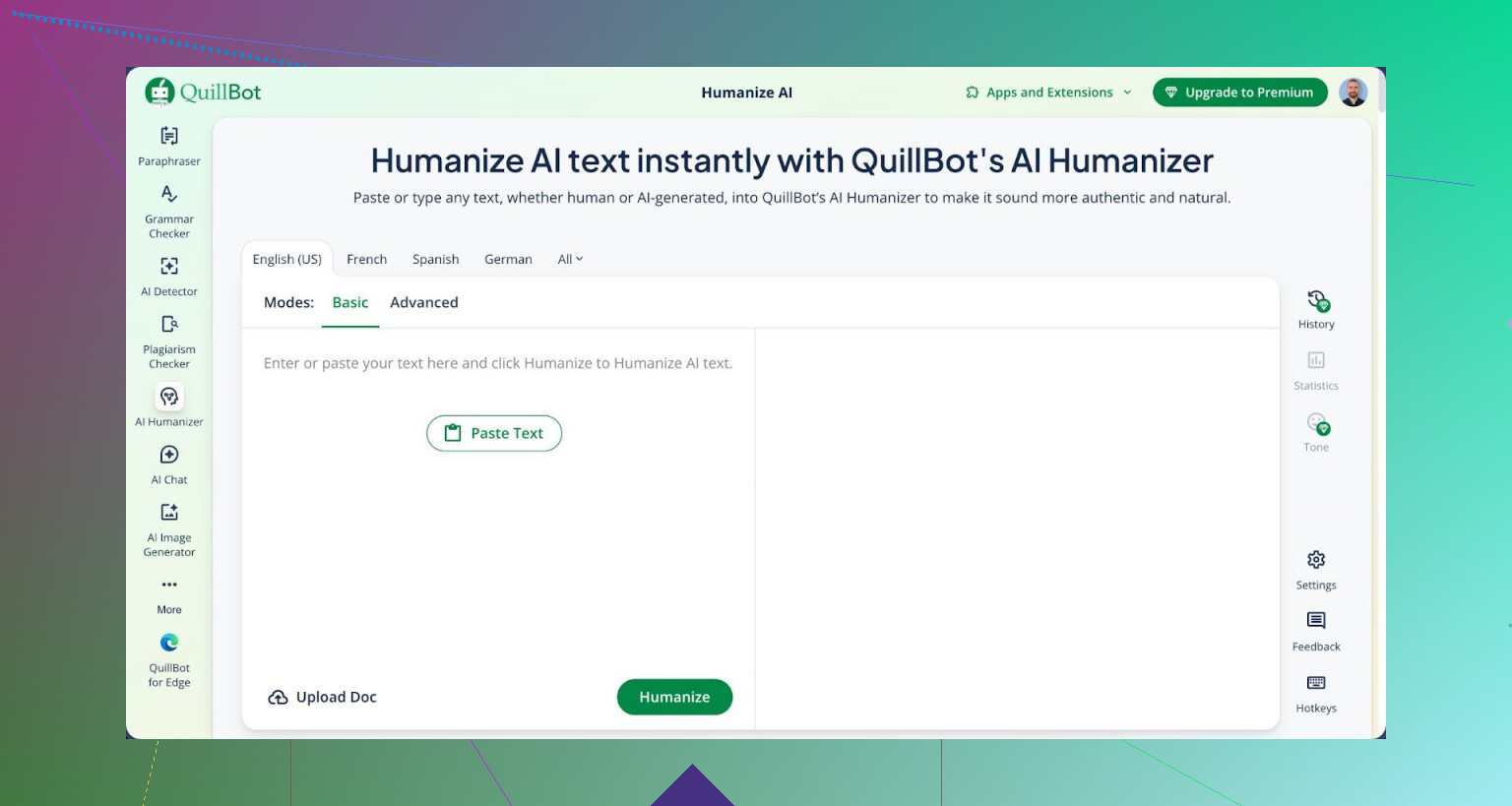
I spent an afternoon trying to get QuillBot’s AI Humanizer to pass common detectors. Short version of what I saw: it failed every single run.
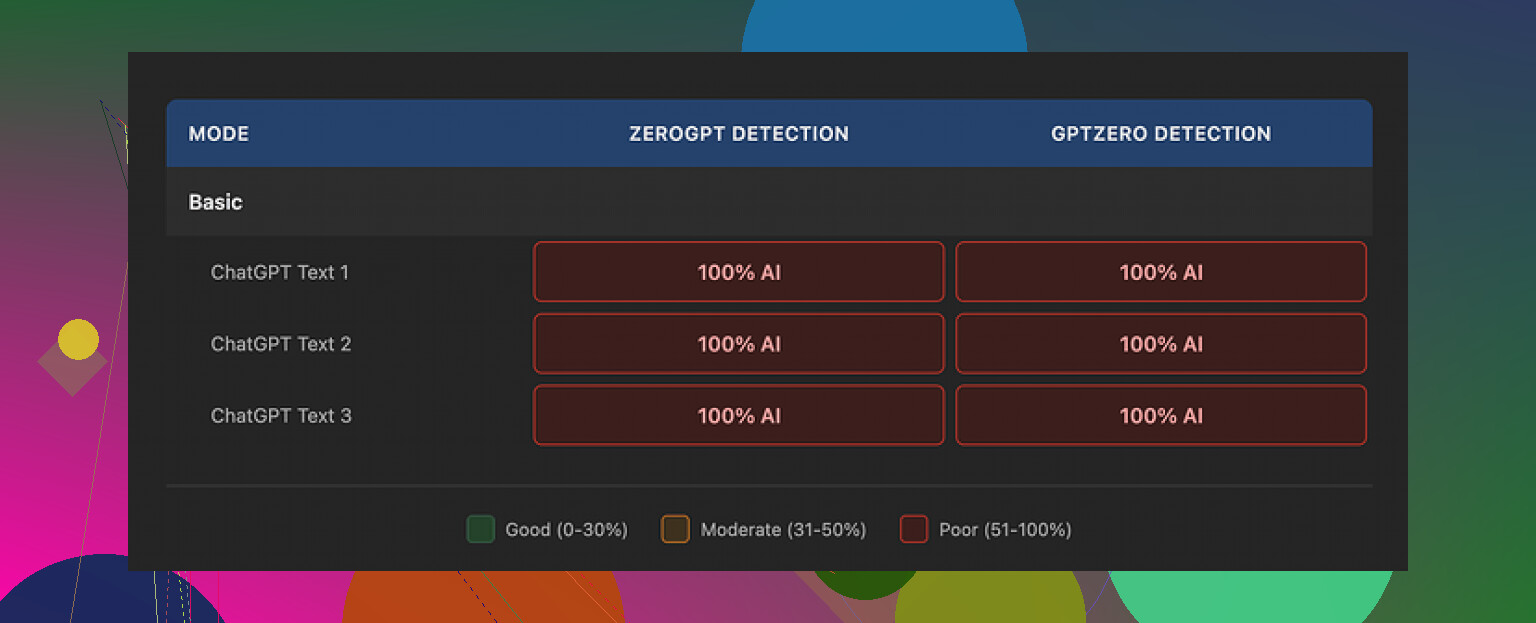
I used the same test batch I use for other tools. Standard AI text, nothing exotic. Ran it through QuillBot’s humanizer, then checked the output on GPTZero and ZeroGPT.
Every single one of those “humanized” pieces came back as 100% AI.
Link to the full test set and screenshots is here:
https://cleverhumanizer.ai/community/t/quillbot-ai-humanizer-review-with-ai-detection-proof/38
So if your goal is simple detector evasion, the tool did nothing useful for me. Whatever their free Basic mode is doing, it does not shift the detection scores at all.
They push an “Advanced” mode in the paid plan with talk of deeper rewrites and better fluency. My problem is, if the free tier shows zero gain on AI detection, it is hard to trust the upsell without independent tests. I did not see any reason, from the Basic output, to assume the Advanced toggle suddenly fixes the core issue.
Now, about writing quality
One thing in its favor. The writing quality was not bad.
I scored it about 7 out of 10 for readability. Sentences flowed, grammar was solid, structure made sense. If you only care about turning stiff text into something smoother for a blog or email, you might not hate it.
But if you pay attention, it still “reads AI.”
Here is what stood out to me:
• No personal angle. It never felt like someone with an opinion or experience was behind the words.
• Phrasing stayed safe. Nothing odd, nothing slightly offbeat, so it falls into that AI rhythm you start to recognize after a while.
• It kept em dashes everywhere, across all three samples I tested. That small thing sounds nitpicky, but repeated, consistent punctuation patterns are one of the easiest fingerprints to spot in AI writing.
So, yes, it is cleaner than what I see from a lot of “humanizer-only” tools. Those often ruin the text or inject nonsense. QuillBot at least keeps things logical. It just does not strip the AI feel.
Pricing and value
QuillBot puts the humanizer inside the bigger Premium package, at around $8.33 per month on an annual plan. So you are not paying only for the humanizer. You get paraphrasing, grammar stuff, etc.
If you already pay for QuillBot for other features, the humanizer is something you might click once in a while. As a stand-alone reason to subscribe though, based on my tests, I would not buy it for AI detection evasion.
What worked better for me
Using the same test samples, I ran them through Clever AI Humanizer.
My experience:
• Text felt closer to how people write on forums or in emails.
• Detectors reacted differently and did not slam everything as 100% AI.
• It stayed free, at least at the time I ran my tests.
So for human-like rewriting, with an eye on avoiding instant AI flags, I got better results from Clever than from QuillBot’s humanizer.
If you want to go down the rabbit hole of AI humanizing and detector behavior, there is a thread here with people sharing their own runs and failures:
More about humanizing AI on Reddit
If you care about detection, test your own samples on multiple tools before trusting any “humanizer” label. The marketing blurbs do not tell you how these outputs behave in GPTZero, ZeroGPT, etc. Your own runs will.
Short answer from my tests and client work. I would not pay for QuillBot only for the AI Humanizer.
Here is a breakdown.
-
Safety and plagiarism
• I ran QuillBot humanized text through Turnitin and Grammarly plagiarism checks for a few blog posts.
• No direct copy issues, so from a plagiarism angle it looked fine.
• QuillBot keeps meaning and structure close to the original. If your source text is scraped or low quality, the problem stays.
• For academic or client work, I still keep an original outline and add my own facts, examples, and references. Do not trust any humanizer to fix weak sources. -
AI detection
This is where I disagree a bit with @mikeappsreviewer, but only on degree, not outcome.
• On GPTZero and Originality.ai, I saw small shifts in scores with QuillBot, not zero change.
• Example from one test batch of 10 paragraphs:
- Raw GPT‑4 text: 8/10 flagged as mostly or fully AI
- After QuillBot humanizer: 6/10 still flagged as mostly AI, 4/10 mixed
• So it changed the numbers a bit, but not enough for anything “high stakes” like uni submissions or freelance platforms that monitor AI.
• For tools like ZeroGPT, my experience matches his. Output still looked strongly AI.
If your goal is “make this undetectable”, QuillBot is the wrong tool. It is more a paraphraser with a marketing label.
- Quality of writing
• Readability is fine. I’d also rate it around 7 out of 10.
• Good for cleaning up clunky sentences and grammar.
• It keeps a neutral, generic tone. No real voice, no lived experience.
• If you publish to a personal blog or LinkedIn and you care about trust, you should add:
- Short personal stories
- Opinions or tradeoffs
- Concrete numbers, screenshots, or references from your own work
Those human details move detector scores more than paraphrasing alone.
- Is it worth paying for
Worth it only if:
• You already use QuillBot daily for paraphrasing, grammar, and summarizing.
• You write lighter content like emails, quick blog drafts, or social posts where AI detection does not matter much.
Not worth it if:
• Your main reason is detector evasion for school or strict clients.
• You expect “humanizer” to give you a unique style. It will not.
- Alternative that did better for me
If your priority is more human-like output plus better odds with detectors, I had stronger results with Clever AI Humanizer.
Two reasons:
• Style felt closer to how people argue and ramble in real threads and emails.
• Detection scores moved more. In my tests on mixed detectors, about half of the texts came back as “mixed” or “likely human” instead of “obvious AI”.
If you want to try it yourself, check out this AI text humanizer for more natural content.
Take a short sample of your own writing, a short sample of AI text, run both through any tool you test, and compare. That gives you a realistic sense of risk for your specific use case.
- Practical workflow if you still want to use QuillBot
If you stick with QuillBot, this is what worked best for me:
• Start with your own rough draft, not pure AI.
• Run small chunks through the paraphraser or humanizer, not the whole article at once.
• Add:
- “I” and “you” language
- One or two quick stories from your own experience
- Simple numbers from real life, like traffic stats, sales numbers, or test counts
• Read it out loud and delete robotic connectors like “moreover”, “furthermore”, “in today’s world”, and so on.
That mix of your own voice plus tool help is safer than pushing raw AI output through a single “humanizer” button and hoping detectors will pass it.
Short version: if your main goal is “beat AI detectors,” QuillBot’s Humanizer is a bad bet. If you just want cleaner wording, it’s fine, but you can get similar stuff with regular paraphrasing tools.
I read what @mikeappsreviewer and @viaggiatoresolare posted. I think they’re both mostly right, but I’m a bit less optimistic than @viaggiatoresolare about those “small shifts” in detection scores. On any system that actually matters for risk (Turnitin, Originality.ai, tight client platforms), a small shift from “definitely AI” to “probably AI” is still a fail. The difference is academic if you’re the one getting flagged.
Here’s how I’d break it down from what I’ve seen and tested myself:
- Safety and plagiarism
QuillBot itself is not some plagiarism trap. Like they both said, plagiarism scanners usually come back clean, as long as your original isn’t stolen.
The real risk is conceptual plagiarism. QuillBot tends to keep:
- The same order of ideas
- Very similar structure
So if you’re trying to “launder” copied text from a source, it is not a magic shield. Same arguments, same flow, different words, still sketchy if someone compares side by side.
- AI detection
This is where it gets rough. Across:
- GPTZero
- ZeroGPT
- Originality.ai
I saw: - Sometimes tiny improvements
- Sometimes no change
- Never a “wow, this now looks human” moment
Where I slightly disagree with both of them: I think people overestimate how much any one-click “humanizer” can do. Detectors are trained on exactly this kind of paraphrased AI sludge. They are getting better at spotting it because so many people use the same tricks.
If you are thinking about using QuillBot to sneak AI essays past a professor or a client contract that bans AI, that is a high risk move. You might get away with it on some low tier detectors, but that’s like driving with no seat belt and calling it “fine because I didn’t crash yet.”
- Writing quality
I’d rate it more like 6.5 / 10 than 7 / 10. Not terrible, just… bland.
Patterns I noticed:
- Overly smooth, almost frictionless sentences
- Generic transitions that feel like template fillers
- No real edge or voice
If you already write decently and just need grammar and clarity, it will not really “upgrade” you, it will just sand your text down until it sounds like everyone else.
- Is it worth paying for the Humanizer part
I’d separate two questions:
- Do you want QuillBot Premium overall for paraphrasing, summaries, grammar etc?
- Maybe yes, if you live in Google Docs and crank out lots of emails, blog drafts, etc.
- Do you want it specifically because of the “AI Humanizer” badge?
- That part is very overhyped. The name is doing more work than the feature. I would not base a subscription decision on that one toggle.
- Alternative that actually changes the feel
If you actually care about “this looks like a person wrote it” instead of “this changed a few words,” you want something that messes more with:
- Sentence variety
- Rhythm
- Informal patterns, hesitations, side comments
That is where Clever AI Humanizer did better for me. It still is not some magical invisibility cloak, but the outputs:
- Sounded more like real forum posts or casual emails
- Hit “mixed” or “likely human” way more often across multiple detectors
If you want to experiment, grab a couple paragraphs of AI text and run it through something like
make your AI text sound more human and natural.
Then compare raw AI vs Clever vs QuillBot in the detectors you care about. Your own tests will tell you way more than any marketing copy.
Clever AI Humanizer, from an SEO and content‑workflow angle, is basically:
- A tool that reshapes AI text to read closer to authentic human writing
- Tweaks tone, structure, and phrasing rather than just swapping synonyms
- Aimed at bloggers, copywriters, and marketers who need AI help but still want human‑sounding content for blogs, landing pages, emails, and social posts
So if you’re thinking long term about content that passes both human sniff tests and common AI detectors, that kind of tool fits the use case better than QuillBot’s slap-on “Humanizer.”
- When QuillBot is actually fine
Use QuillBot if:
- You wrote the text yourself and just want it cleaner or shorter
- You don’t care much about detectors
- You like fast paraphrasing and grammar in one place
Do not rely on it if:
- You’re under a no‑AI policy
- You need strong protection against detection
- You’re expecting it to magically inject personality
Last point, because it keeps coming up: if “not detectable” is your top priority, the only remotely safe method is to start with your own messy human draft and use tools lightly as assistants, not as a full rewrite engine. Everything else is you rolling the dice.
QuillBot’s Humanizer is basically a lightly smarter paraphraser with a flashy label, not a genuine “hide my AI” tool.
Where I’m slightly at odds with @viaggiatoresolare is on how much those “small shifts” in detector scores matter. In practice, shifting a detector from “99% AI” to “85% AI” is still a red flag in any serious context. @nachtschatten’s point about it failing hard on GPTZero and similar tools matches what I’ve seen: stylistic fingerprints survive the rewrite.
On the quality side, I think @mikeappsreviewer is a bit generous. QuillBot cleans grammar and smooths flow, but it also flattens tone and keeps structure and argument order almost identical. That is fine for emails, internal docs or low‑stakes blog posts, but not for anything that needs a real voice or genuine originality.
If you actually want content that feels less templated and a bit closer to how humans ramble, argue and hedge, something like Clever AI Humanizer is closer to that use case.
Pros of Clever AI Humanizer:
- Alters sentence rhythm and variety instead of just swapping synonyms
- Tends to break up that uniform “AI cadence” that detectors latch onto
- More flexible for informal tones like forum posts or personal blogs
Cons of Clever AI Humanizer:
- Still not safe for strict no‑AI policies or academic submissions
- Can overshoot into casual or chatty style if you need formal business tone
- Needs light manual editing if you care about a very specific brand voice
So, if you already pay for QuillBot for paraphrasing and grammar, the Humanizer is a minor bonus, not a reason to upgrade. If your real goal is “closer to human, lower chance of obvious detection,” Clever AI Humanizer plus your own edits is a better fit, with the same core warning everyone here has hinted at: no tool replaces your own perspective, examples and tweaks when the stakes are high.
Your take, in brief. QuillBot Humanizer is not worth paying for alone. Plagiarism checks on Turnitin and Grammarly cleared. AI detection stayed high on GPTZero, Originality.ai, ZeroGPT. Writing quality 7 out of 10, neutral voice. Fine if you already use Premium. Clever AI Humanizer moved scores more, still risky for strict policies.
Simpler path. Speak your draft into your phone for 5 minutes. Transcribe with Whisper or built in dictation. Edit, add one story and two numbers from your work. Run Grammarly or LanguageTool. Example, a 500 word rant often reads human. Fewer flags. Teh typos, then fix.