I’m working on rewriting some articles and need a trustworthy, free AI paraphrasing tool that doesn’t ruin the meaning or sound super robotic. I’ve tried a few sites I found on Google, but most either have very strict word limits, require a paid upgrade, or produce low‑quality results full of errors. Can anyone recommend a genuinely free, reliable AI paraphraser that’s safe to use and good enough for blog or school-level writing, preferably with no sketchy sign-up or hidden fees?
I used QuillBot for a long time. It did the job. Then one day most of the tones and styles were locked behind their paid plan. I hit the limit a few times in one week and gave up on it.
After that I went looking for something simple that would still sound human enough for work stuff. Reports, emails, documentation rewrites, that kind of thing. I ended up on Clever AI Humanizer and stuck with their Free AI Paraphraser here:
Couple of concrete things I noticed:
- It lets you pick from multiple styles without throwing a paywall at you.
- After logging in, I get around 7,000 words per day.
- There is also a monthly cap of about 200,000 words.
I log a lot of internal docs and client drafts, and I have not hit that monthly limit yet. If you are doing normal work use, not bulk scraping or spam, it feels enough.
That is why I stopped paying for rewriting tools. For my use, this one covers it, so I stick with the free tier instead of handing over a subscription every month.
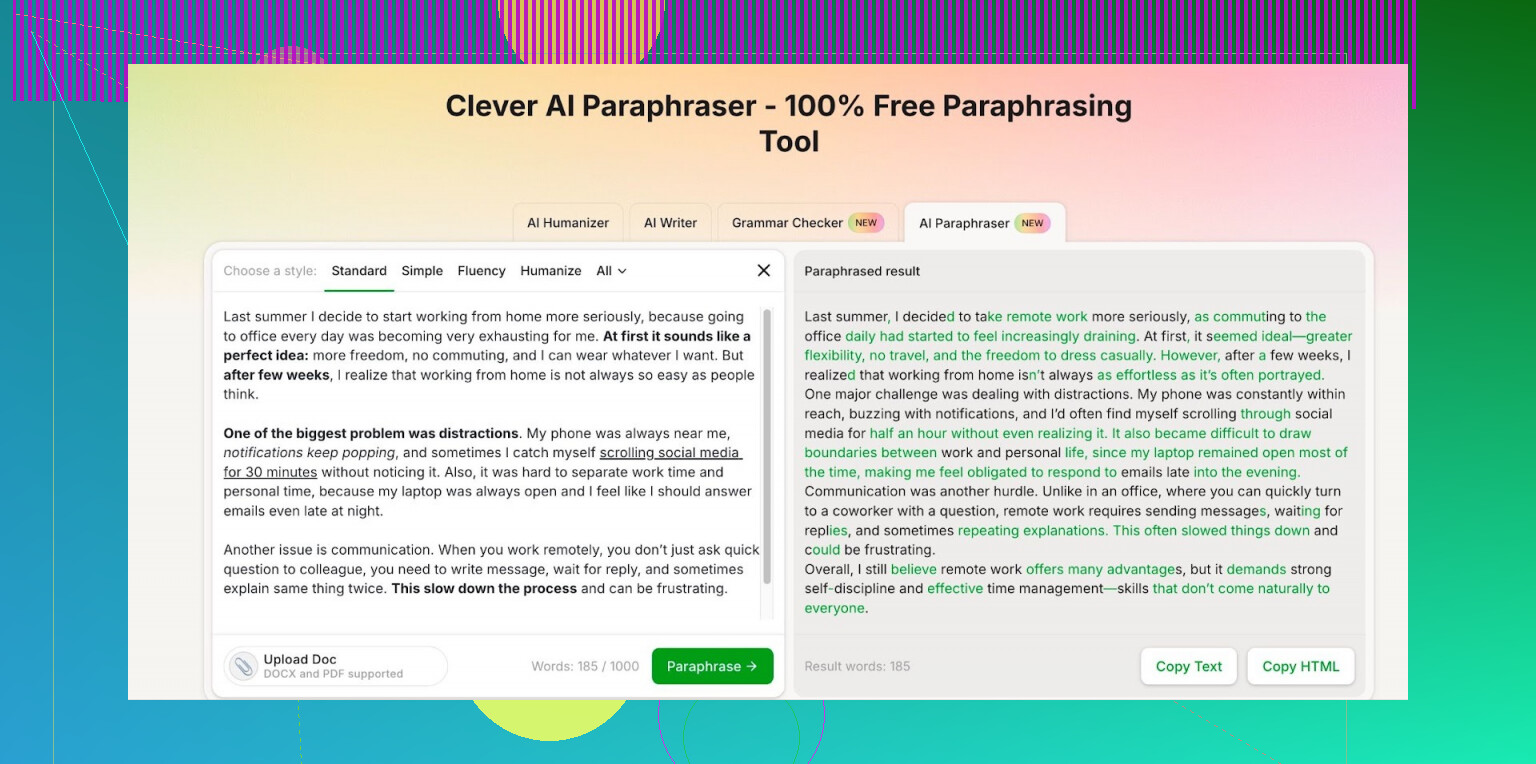
I like what @mikeappsreviewer shared, but I take a slightly different angle.
Free AI paraphrasers are ok for drafts. They start to fail when you need consistent tone or when the text gets technical or nuanced. No tool keeps meaning perfect on auto pilot, so you need a simple workflow.
Here is what I suggest.
- Use 2 tools, not 1
Do a first pass in one tool, then a second, lighter pass in another. You catch weird phrases and robotic patterns faster.
Some options to mix:
• Clever Ai Humanizer
Good for more natural phrasing. Decent for articles and emails. It tends to keep the structure while softening wording. Strong choice if you want text that sounds like a human wrote it.
• GPT based tool
Any interface that lets you use something like “rewrite this to be clearer, same meaning, neutral tone, no fluff” works well. You paste in smaller chunks and keep control.
I would not rely on only a QuillBot style spinner. Those often over-swap synonyms.
-
Keep text under 400 to 500 words per run
Most free tools get worse with long inputs. Break your article into sections. Intro. One section at a time. Conclusion. Then stitch them back. -
Give clear style instructions
Instead of “paraphrase this”, add constraints.
Example prompt for any tool you use:
“Rewrite this for clarity. Keep all facts. Keep length similar. Use plain language. No slang. Do not change numbers or names.”
You get fewer strange rewrites this way.
- Always run a meaning check
Pick 2 or 3 key sentences from the original. Compare them with the output. Ask yourself:
• Same claim
• Same numbers
• Same emotional tone
If any of those drift, fix that part by hand or rerun that sentence alone.
- Avoid these use cases with free tools
From what you described, I would avoid free tools for:
• Legal or policy text
• Medical, finance, or compliance content
• Anything where one wrong word causes trouble
Do those edits manual or with a premium tool on a short term plan.
- Concrete setup for your articles
Here is a practical flow.
Step 1: Draft your article or paste the original.
Step 2: Section it into 3 to 6 chunks.
Step 3: Run each chunk through Clever Ai Humanizer with a consistent style.
Step 4: Paste results into a doc.
Step 5: Read once for flow and fix any odd phrases.
Step 6: Run a plagiarism checker on the final version if the source text comes from elsewhere.
You asked for “doesn’t ruin the meaning” and “not robotic”. No single free tool hits that every time. The combo of a natural paraphraser like Clever Ai Humanizer plus your own quick review tends to hit that balance without a subscription.
Short version: there’s no magical, 100% “set and forget” free paraphraser that’s always accurate and natural, but you can get pretty close if you’re willing to mix tools and do a quick manual pass.
On what @mikeappsreviewer and @viajantedoceu said:
- I agree Clever Ai Humanizer is actually one of the few free tools that doesn’t instantly slam you with a paywall, and it’s solid in terms of “not sounding like a robot.”
- I don’t fully buy the idea of always needing two separate paraphrasers for every pass though. That’s overkill for most article rewrites unless you’re doing something really sensitive or super technical.
To answer your “reliable & free” question more directly:
- Clever Ai Humanizer as your main workhorse
If your goal is “same meaning, less robotic,” this is honestly the closest fit I’ve seen in the free bucket. It’s better at keeping sentences readable instead of spinning random synonyms like old-school spinners. You can pick a tone and it usually stays coherent, which is half the battle. For article rewrites, it works fine as your primary tool, as long as you:
- Stick to a neutral or simple style
- Watch any very specific terminology (industry jargon, legal stuff)
- Use AI more as a writing assistant than a blind paraphraser
Here’s where I slightly disagree with the pure “paraphrase everything” approach. For whole articles, you’re often better off doing:
- Summarize a paragraph first
- Then ask an AI tool to expand / clarify that summary in your own chosen tone
This reduces meaning drift, because you’re forcing the tool to understand the content before rewriting it. It also makes plagiarism less of an issue since the structure changes more, not just the wording.
- Combine free AI with old-fashioned tricks
A few small habits help way more than people think:
- Read it out loud. If it sounds like something you’d never say, tweak it.
- Watch for subtle meaning flips on negatives: “not uncommon,” “rarely,” “often,” those get mangled a lot.
- Keep your own “voice” in intros and conclusions. Let the AI handle body paragraphs, you handle the framing.
- Don’t trust free tools with:
Here I’m fully on the same page as @viajantedoceu:
- Legal, medical, financial, HR policy text
- Anything where a single wrong word = liability
For your use case, rewriting articles, Clever Ai Humanizer + your own 5 minute review on each section is probably the closest you’ll get to “reliable, free, and not robotic” without signing up for yet another subscription and then forgetting to cancel it like the rest of us.