I need to recover some deleted files from my PC, and Recuva keeps coming up in search results. I have not used it in years, and I am worried about malware, bundled software, or privacy issues with newer versions. If anyone has used Recuva recently, can you tell me if it is still safe and what I should watch out for before installing it?
People ask this a lot, and I never answer with a clean yes or no. If you mean malware safe, then yes, Recuva is safe. It is not a virus. It is not built to trash your PC. If you mean privacy, or whether using it might hurt your recovery odds, then you need the longer version.
I spent a dumb amount of time testing recovery apps on old SSDs, USB sticks, and one dying laptop drive I should have retired sooner. Recuva is fine in some cases. It also has limits people tend to ignore until they lose more data.
About the old malware scare
The thing people still bring up is the 2017 CCleaner mess. Same company family. Piriform got hit in a supply chain attack and malware ended up in an official CCleaner update. Bad incident, no point softening it.
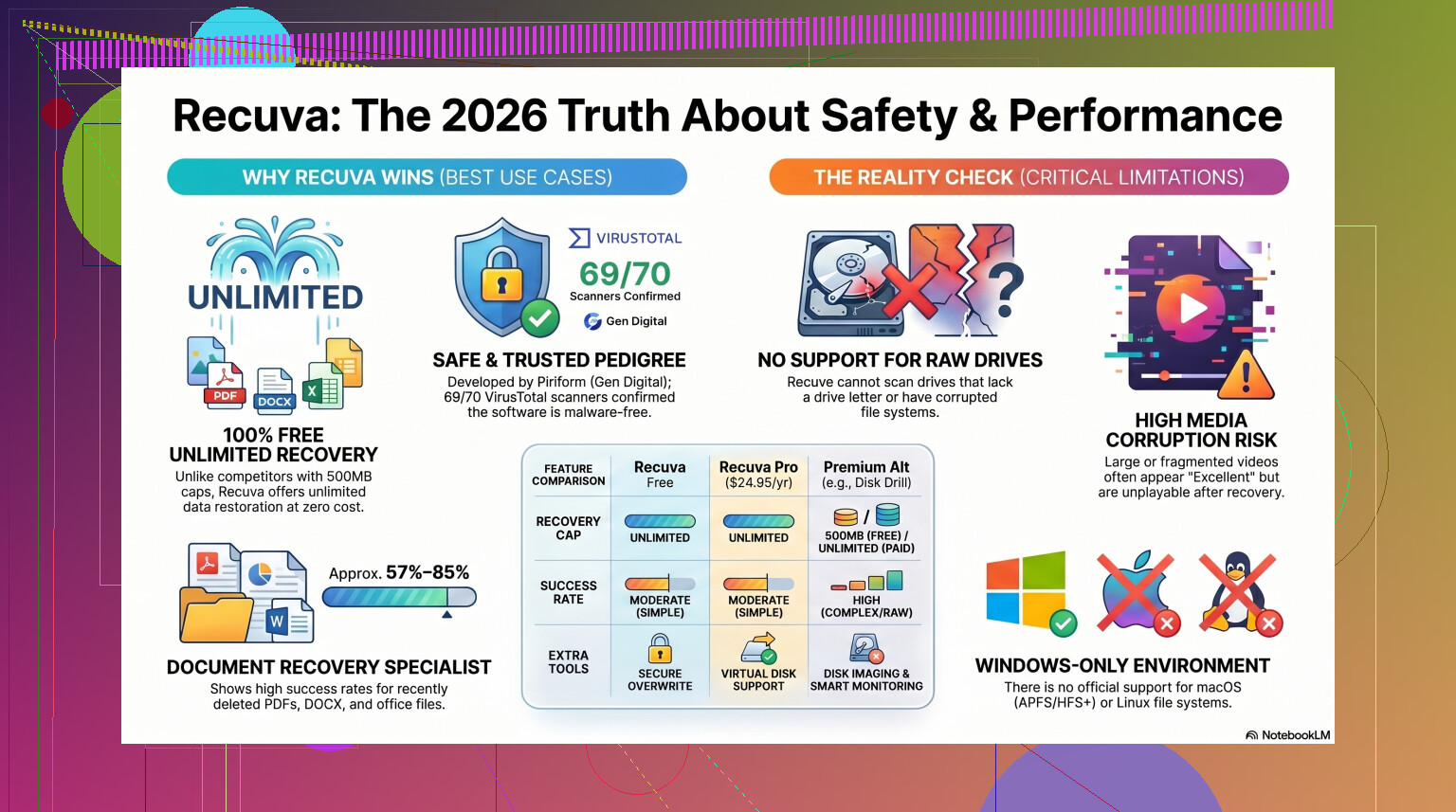
Still, that was years ago. Piriform moved under Avast, then Gen Digital. In 2026, the current Recuva installer looks clean in normal checks. If you throw it at VirusTotal, you might see one odd flag from a smaller engine. I saw this myself a few times. Usually it comes down to the app probing disk structures and deleted sectors, which some heuristic scanners hate. If you pull Recuva from the official source, the virus risk looks low.
Privacy, and the part people skip past
Safe to install does not mean private. Gen Digital says what it collects, and some of it is standard software telemetry. IP address, device ID, OS details, location data for licensing and fraud checks. If that bugs you, fair enough.
First thing I did after install was open Options, then Privacy, then turn off 'Help improve our other apps by sending usage data.' You should do the same if you want less reporting. One detail worth noting, they keep IP addresses for 36 months before anonymizing them. For a free tool, that tradeoff exists whether people read the policy or not.
The part where users wreck their own recovery chances
This is the big one. Recuva itself is not what usually destroys data. People do it by installing or saving files onto the same drive they are trying to recover from.
When you delete a file in Windows, the data often stays there for a while. The system mostly removes the reference and marks the space as reusable. So if your deleted photos are sitting on Drive D, and then you install Recuva onto Drive D, you might overwrite the exact sectors you needed. I did this once with an old SD card years back. Learned it the hard way.
The safer move is the portable version. Put it on a USB stick. Run it from there. No full install on the problem drive. Also, when Recuva finds your files, do not restore them back to the same disk. Save them to an external drive, another internal drive, or at least a separate partition if you have no other option.
How well it works in 2026
Here is where the tone shifts a bit. Recuva still works, but it feels old. The foundation of it has not changed much since around 2016. It got patches later so it would behave on Windows 11, sure, but it still acts like a classic undelete utility, not a broader recovery tool.
For simple mistakes, it does fine. Empty Recycle Bin by accident on a healthy Windows machine, then notice it right away, Recuva is often enough. It is quick. It is light. It does not hit you with a recovery cap on the free version, which is rare now.
Once the case gets messy, the cracks show. If Windows reports the drive as RAW, or tells you to format it before use, Recuva often does nothing useful. In a few tests on formatted USB drives, recovery rates tend to land around 63% to 67%. And even those numbers flatter it a little, because finding a file entry is not the same as restoring a working file.
I have seen Recuva mark an image as Excellent, then the JPG would not open. Same with documents. Same with videos. It also likes dumping recovered files into one huge folder with broken names like 00001.jpg, 00002.jpg, and so on. If you are sorting through thousands of files, that turns into a mess fast.
When I would stop using it
If the files matter, I would not stay with Recuva for long after the first failed pass. Wedding photos, tax records, client files, project archives, anything with no backup, I would be more careful. Repeated scans are not free in a practical sense. They add wear, and if the drive is already unstable, time matters.
If Recuva misses the files, returns corrupted junk, or refuses to read the drive, I would move on. Same if you are dealing with a RAW partition, damaged file system, or media from a Mac.
I had better results with Disk Drill on harder jobs. It handles cases Recuva tends to ignore, especially damaged partitions and RAW volumes. In broader recovery tests, it often lands around 95% to 97% on formatted drives, which is a different class of result. One feature I wish more people knew about is Byte-to-Byte Disk Imaging. You clone the failing drive first, then scan the clone instead of hammering the original hardware. If the physical disk quits halfway through, you still have the image. That matters a lot more than people think.
Photo and video recovery is another weak spot for Recuva. Fragmented video files, camera RAW formats from Nikon or Canon, larger media sets, it gets ugly fast. Disk Drill usually handles file signatures and reconstruction with less guesswork — if you want to see both tools side by side, this review is worth a watch.
My short version
If you need a free first try on a healthy Windows drive after a simple delete, Recuva is fine. Safe enough, easy to run, quick scan, low hassle.
- Download it from the official site.
- Use the portable version when possible.
- Turn off data sharing in the privacy settings.
- Do not expect miracles on damaged or formatted drives.
If it fails, stop writing anything to the drive. No more installs. No copying random stuff onto it. No second guessing with five more recovery apps in a row. Move to a stronger tool like Disk Drill, especially if the files matter.
So yeah, Recuva is safe in the malware sense. In the recovery sense, it is safe only if you use it carefully. That second part is where people slip up, and yeah, I did too once.
Yes, Recuva is still safe if you get it from the official Piriform site. I checked it a few months ago on a test box. No malware, no shady browser hijacker stuff, no forced junk app install. I still do not love the parent company track record, so I would not call it spotless. I think @mikeappsreviewer is right on the malware part, but a bit generous on privacy. I treat it like any free utility. Install carefully, opt out of data sharing, then remove it after the job if you want.
My bigger issue is performance, not safety. Recuva is fine for simple undelete jobs on a healthy Windows drive. It falls off fast once the file system is damaged, the drive is formatted, or the SSD has TRIM done its thing. On SSDs, deleted files are often gone fast. No app fixes tht.
If the files matter, I would skip trial-and-error. Use Recuva first only if this was a recent delete and the drive is stable. If it finds garbage names or corrupt files, switch tools. Disk Drill tends to do better on tougher cases and gives you a cleaner scan view. This guide on top data recovery software for deleted files and damaged drives is a decent starting point.
One more thing people miss. If the drive is making noises, freezing Explorer, or disconnecting, stop scanning it. Clone first or go pro. Thats where people lose stuff for real.
I’d say Recuva is mostly safe now if you grab it from the official source, but I’m a little less relaxed about it than @mikeappsreviewer. Not because it’s malware, more because old utility apps under big software companies tend to collect more telemetry than people expect. So: safe enough to run, not something I’d keep installed forever.
What I would do is keep it simple:
- use it only for a quick undelete attempt
- don’t install it on the same drive you’re recovering from
- don’t recover files back onto that same drive
- uninstall it after if you’re paranoid
Also, people oversell Recuva a bit. It’s still a decent Windows file recovery tool for accidental deletion, but it’s not magic. If the deleted files were on an SSD, TRIM may have already wiped the useful data. If the drive is corrupted or acting weird, Recuva can waste time.
For basic background, this is the Recuva file recovery software overview.
Where I kinda agree with @sognonotturno is that safety isn’t really the main question. Recovery quality is. If the files are actually important, I’d move to Disk Drill pretty fast because it handles tougher cases better and the interface is less janky, tbh. Recuva is fine for “oops deleted a folder.” Beyond that, ehhh.
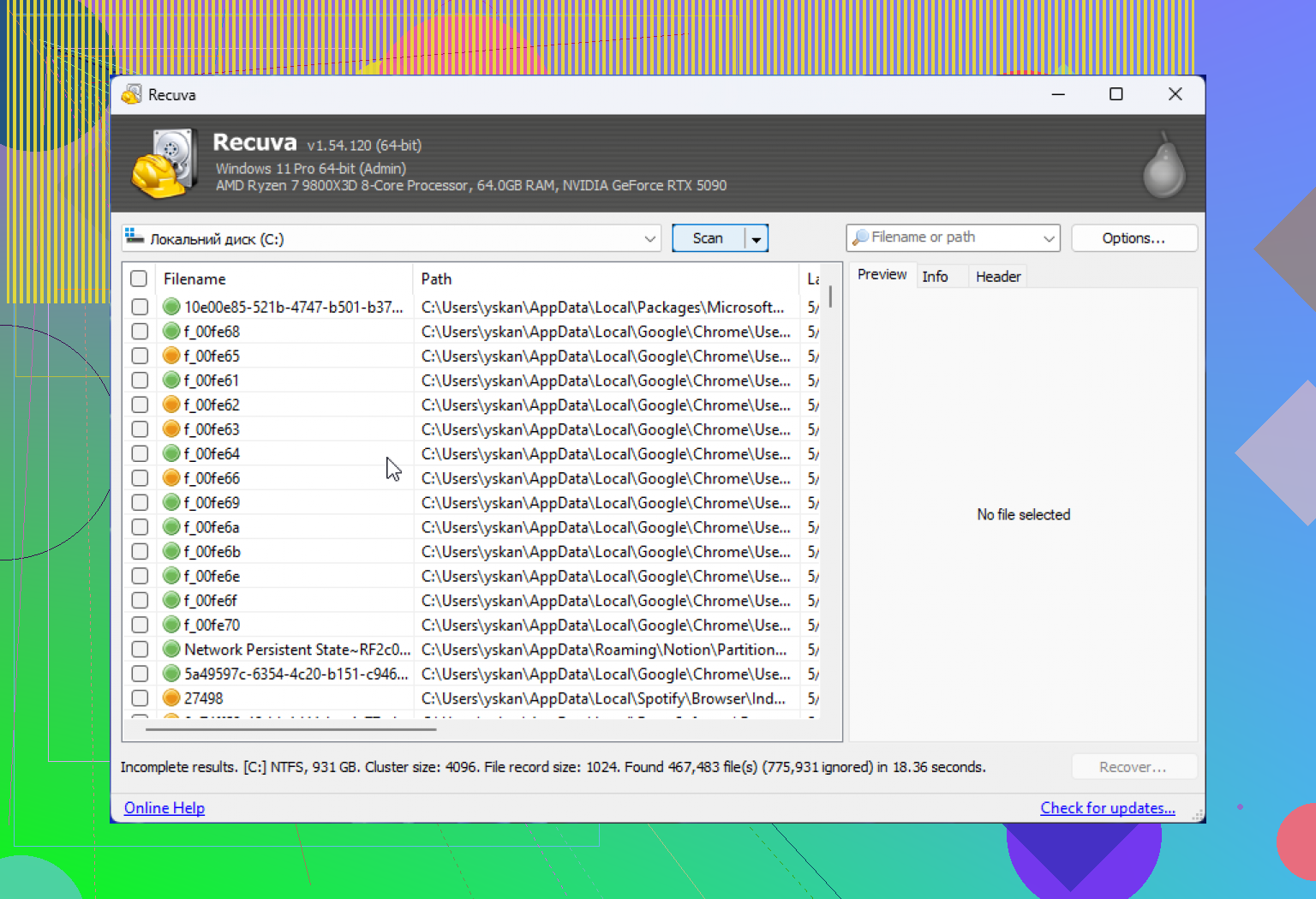
I’m a bit less suspicious of Recuva than @sognonotturno, but less trusting than @mikeappsreviewer. Current Recuva is generally safe if it comes from Piriform’s official download, and I have not seen recent reports of bundled junk in the installer. The bigger risk is not malware, it’s using it in a way that hurts recovery.
My take:
- Recuva is fine for a fast, simple undelete on a normal Windows drive
- I would not rely on it for damaged partitions, formatted disks, or flaky hardware
- I also would not install any recovery app onto the same drive you’re trying to recover from
One place I slightly disagree with @sterrenkijker: uninstalling it right after is optional, not necessary. If you trust the source and disable telemetry, it’s not some ticking time bomb. I just wouldn’t leave a rarely-used utility around for no reason.
If the data matters, I’d treat Recuva as a first pass only. After that, switch to something stronger like Disk Drill.
Disk Drill pros:
- better at tougher recoveries
- cleaner preview and file organization
- can image a problem drive first
Disk Drill cons:
- not as lightweight
- free recovery limits depend on platform/version
- some people find it a bit too polished for a “serious” tool
So yes, Recuva is still basically safe nowadays. Just don’t confuse “safe to install” with “best choice for important recovery.”