I keep seeing mixed reviews about the Clean Up app for organizing and speeding up my phone, and I’m not sure if it’s really effective or just another bloated tool. Some users say it helped free storage and improve performance, while others complain about aggressive ads and barely any real benefit. Can anyone who has used it long term share honest feedback on features, safety, hidden costs, and whether it actually improves phone performance?
Cleanup App (Phone Storage Cleaner) – my experience vs Clever Cleaner
Cleanup App (Phone Storage Cleaner) review
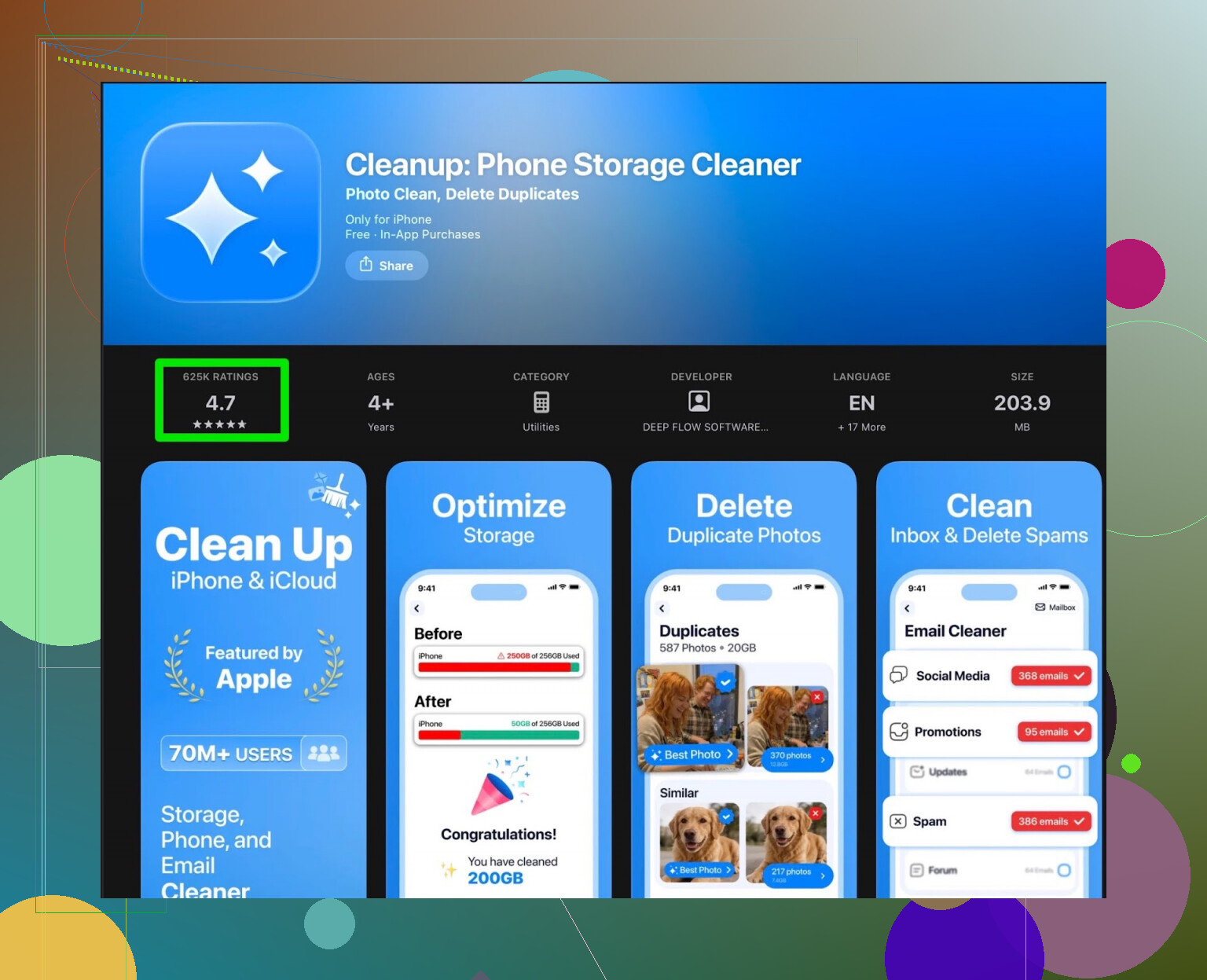
I installed Cleanup App (Phone Storage Cleaner) when my iPhone started yelling about storage being almost full every few days. Photos would not sync, backups failed, the usual mess.
On paper the app looked solid. It scans your gallery for duplicates, similar shots, screenshots, big videos, plus it has contact merge and video compression. The interface looked clean enough, and the first scan did not take long.
Then the paywall hit.
The scan runs, shows you a long list of stuff you could remove, but most of the useful one-tap actions sit behind a subscription. The free tier is more like a demo that tells you “here is the junk” without letting you clear much of it in a sane way.
You can technically proceed without paying, but then you get buried in ads. Repeatedly. Whole experience turns into tap, wait for ad, close ad, tap again. After ten minutes of this I started skipping cleanup tasks because I was tired of waiting.
There are also a few add‑on features that felt out of place for a storage tool, like “secret vault” and extra animations. Looked like someone tried to make the app more “fun” instead of making the core cleanup faster. None of that helped me free more space.
User feedback on Cleanup App
Here is what other people reported, which lined up with what I saw:
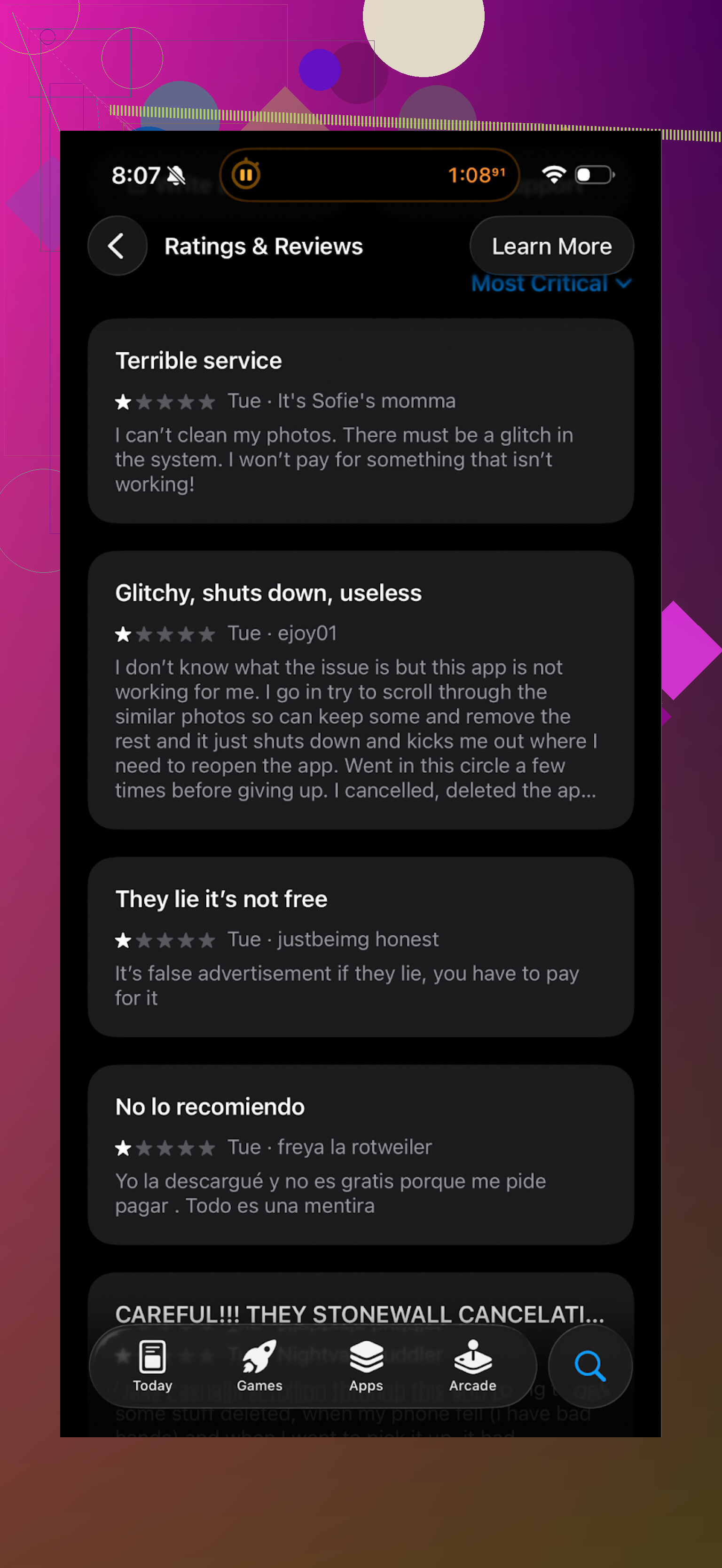
You see the same pattern in the reviews. People hit the subscription wall, complain about aggressive upsells and the ad overload, and some mention that the free version does not do much beyond scanning.
Switching to Clever Cleaner
After a week of trying to live with Cleanup App, I removed it and tried Clever Cleaner instead:
Clever Cleaner on the App Store
First thing I noticed, it lets you work through your junk without hammering you with subscription screens. There are paid options, but they are not in your face every second tap.
What helped most:
• Duplicate photos: It grouped obvious duplicates and near‑identical shots, and the AI picks made sense in most cases. I still checked them, but it cut review time a lot.
• Big files: It lists large videos and documents sorted by size, so you hit the biggest space hogs first instead of scrolling through your whole library.
• Screenshots: It isolated screenshots in one place. I cleared more than 1 GB of them in one run.
On my phone, after the first cleanup with Clever Cleaner, I freed a bit over 9 GB, mostly from old videos, screen recordings, and burst photos. Same device, same data, Cleanup App had shown the issues, but the friction from ads and paywalls stopped me from finishing the job.
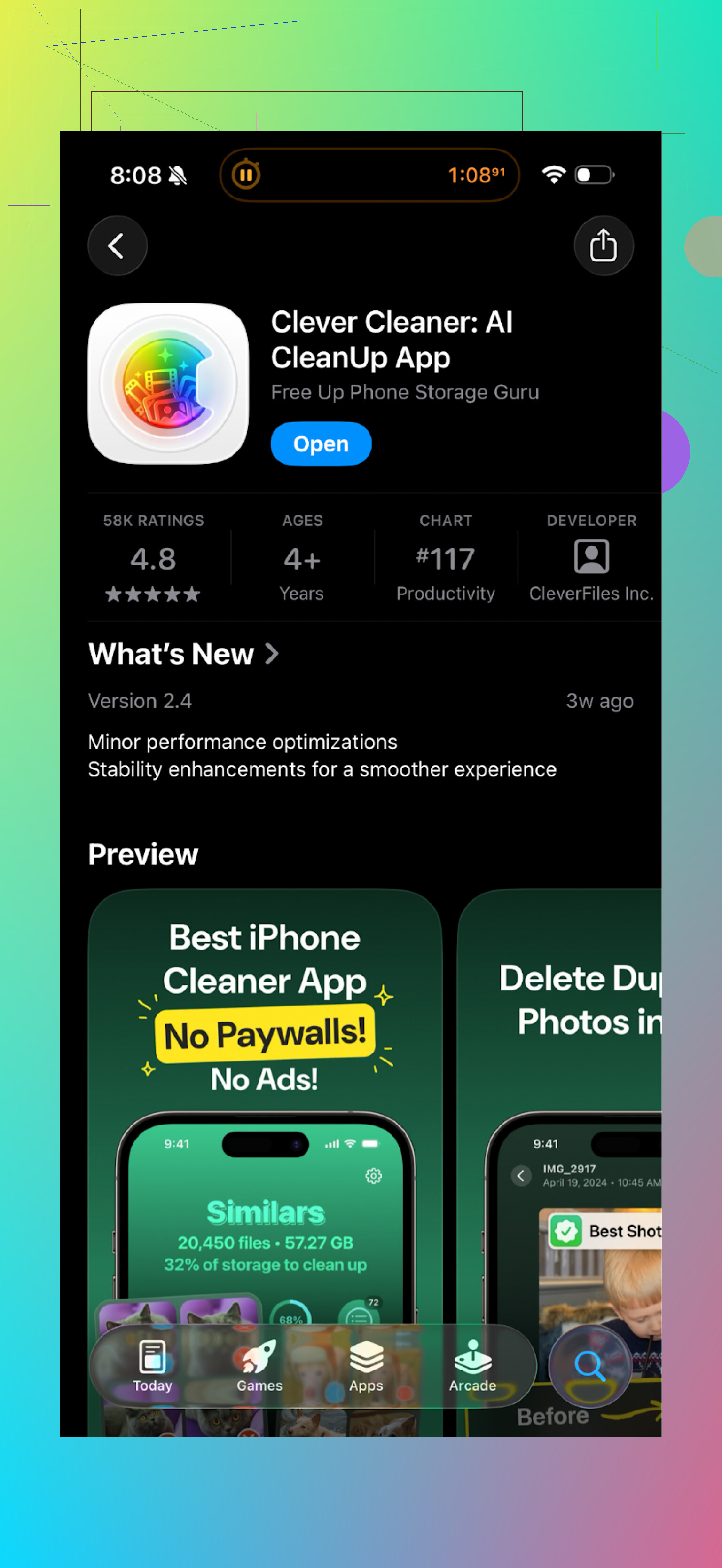
Here is what Clever Cleaner looks like in use:
Day to day difference
If you are trying to decide which one to use, here is how it played out for me in practice:
• Setup
Cleanup App: Quick to install, but pushes subscription early.
Clever Cleaner: Straightforward start, fewer interruptions.
• Free usage
Cleanup App: Lets you see your junk, makes it hard to clean a lot without either paying or sitting through many ads.
Clever Cleaner: Lets you do meaningful cleanups without feeling blocked all the time.
• Speed of cleaning
Cleanup App: Scan is fine, progress after that slows down because of ads and paywalls.
Clever Cleaner: Scan plus cleanup in one session felt faster, since I could move through groups without constant breaks.
If your main goal is to free storage on an iPhone without getting dragged through upsells, Clever Cleaner made it simpler for me.
Extra links if you want to check it yourself
YouTube video about Clever Cleaner

Clever Cleaner homepage
Get Clever Cleaner on the App Store
Short answer from my side: I’d skip Clean Up and use something else unless you plan to pay and do not mind friction.
A few points, trying not to repeat what @mikeappsreviewer already covered:
-
What Clean Up is good at
• It scans fast and surfaces duplicates, similar photos, large files, and contacts issues.
• The detection quality is decent. On a test phone with about 8k photos, it flagged roughly the same trash as other cleaners.
• It can help free storage if you are patient and okay with its flow. -
Where it falls apart
• Free tier feels like bait. You see the junk, but bulk actions are locked behind paywalls or ads.
• Aggressive upsell flow slows you down. On one device I counted 6 pay prompts in the first 15 minutes.
• Extra stuff like “secret folders” adds weight without helping storage or speed. It behaves like a distraction. -
Performance impact
• Storage freed: if you commit and pay, you will clear space. That part is not fake.
• Speed: iOS handles memory and caching. Cleaning photos and videos helps storage, not overall speed. You might notice smoother backups and updates, but not big FPS or app speed jumps. Any app promising “phone feels new” overstates it. -
Privacy angle
• These cleaners need deep access to photos and contacts.
• Check if the app sends data to servers. Some similar tools upload thumbnails or metadata. If privacy matters, read the policy and test with network logging if you are more technical. -
When Clean Up makes sense
• You are okay with a subscription and want one-tap bulk clean.
• You do not mind the extra ads and upsell screens while testing.
• You will review suggested deletions carefully so you avoid losing important photos. -
When to avoid it
• You want a free, quick cleanup without nag screens.
• You prefer simple tools without “vaults” and “fun” extras.
• You plan to run it once, then uninstall. The onboarding overhead is not worth it. -
Alternatives and what I would do
I agree with @mikeappsreviewer on the general pain points, though I think Clean Up is usable if you pay and stick with it. It is not total bloat, more like high friction for average results.
If you want similar features with less hassle, I would look at the Clever Cleaner App. It focuses more on bulk cleaning flows, so you work through duplicates, big files, and screenshots faster. The AI grouping helps cut review time, so you are not stuck tapping hundreds of photos one by one.
- Simple workflow without overthinking it
• Install cleaner of choice, for you probably Clever Cleaner App, or if you insist, Clean Up with a short paid trial.
• Start with large videos and screen recordings. Those eat the most space.
• Then clear old screenshots.
• Then review obvious duplicate and burst photos.
• After that, you maintain with occasional manual cleanup inside the Photos app.
If you like low friction and fewer nags, I would not install Clean Up as your first choice. If you only care about getting a big cleanup done once and do not mind a paywall, it will do the job, but there are smoother options.
Short version: if your goal is “organize and speed up phone,” Clean Up is barely worth installing, and only if you’re ready to pay. As a free tool, it’s mostly friction.
A few points that build on what @mikeappsreviewer and @ombrasilente already said, without rehashing their whole breakdown:
- “Speeding up” your phone
This is the part that’s the most overhyped. On iOS, cleaning photos, videos, and contacts does almost nothing for app launch speed or system smoothness. You might see:
- Fewer “storage almost full” popups
- Less trouble installing big updates or doing backups
But if you’re expecting your phone to suddenly feel like new, that’s marketing, not reality. Clean Up is not a performance optimizer, it’s a storage janitor.
- How “bloated” it really is
I actually disagree slightly with the idea that it’s pure bloat. Technically it does what it says:
- Finds duplicates / similar photos
- Groups large files
- Flags messy contacts
The engine is fine. The bloat feeling comes from: - Extra “fun” stuff like secret vaults
- Onboarding screens, upsells, ads
So the code is not total garbage, but the product experience is cluttered and pushy.
- Is it worth paying for?
If you:
- Have a massive photo library
- Don’t want to manually clean in Apple Photos
- Are okay with a short subscription to do one big cleanup
Then yeah, Clean Up can be “worth it” for a one‑time weekend project. Do a paid week, clean aggressively, cancel. It’s not my favorite approach, but it’s functional.
- Free user experience
Where I line up with both of them: as a free user, it’s borderline not worth your time. The pattern is:
- Fast scan
- Lots of “look how much you could free”
- Then a maze of ads and locked bulk actions
You end up knowing you have junk but feeling too annoyed to actually remove it. That’s the definition of bad UX for a cleaner.
- Clever Cleaner App vs Clean Up
Not going to re-sell what they already described, but if you’re on the fence:
- Clean Up: better fit if you are fine paying quickly and want “one giant nuke button” vibe for a week.
- Clever Cleaner App: better fit if you care about actually using the tool regularly without nag screens every 30 seconds. The AI grouping and bulk actions are more streamlined in daily use, and it plays nicer with a “clean a bit every month” routine.
Personally, if you’re already annoyed enough to ask this question, I’d skip Clean Up as your first install. Try Clever Cleaner App, see if it handles your duplicates / huge videos / screenshots well enough. If that still doesn’t scratch the itch, you can always test Clean Up with a short trial and compare.
tl;dr: Clean Up is not a scam, but as a free solution it’s too annoying, and as a paid one it’s just “okay.” For most people, Clever Cleaner App is a more sane starting point.
Short version: Clean Up is “fine but annoying,” and that friction is the real dealbreaker.
Where I slightly disagree with others here: I don’t think Clean Up is only worth it if you pay. If you are incredibly patient and have a smaller library, you can get some value out of the free tier, but the time cost is ridiculous compared to alternatives.
A few angles that haven’t been hammered to death yet:
1. What problem are you actually solving?
- If your phone is screaming about storage and iCloud backups failing, any competent cleaner will help once you target big videos, long screen recordings, and bursts.
- If you are hoping for “phone feels faster,” neither Clean Up nor Clever Cleaner App nor anything similar will magically fix that. iOS performance is mostly about OS, RAM, and how many heavy apps you run, not leftover photos.
So if your main priority is space, these apps are useful. If it is speed, expectations need to come down.
2. Where Clean Up really loses me
Others already talked about ads and paywalls, so I will focus on the subtler issues:
- The “gamified” UI slows down serious work. Cute animations and extra vault features distract when you just want to kill 10 GB.
- It does not encourage a long term habit. The app feels designed for one aggressive, paywalled purge, not ongoing monthly maintenance.
If you like to tidy in short, regular sessions, that design works against you.
3. Clever Cleaner App in practice
I agree with @ombrasilente and @techchizkid that Clever Cleaner App feels more “get in, get out.” Compared with what @mikeappsreviewer described for Clean Up, here is how it plays out differently, without repeating the same step lists:
Pros of Clever Cleaner App
-
Low-friction bulk review
Groups duplicates and similar photos in a way that lets you swipe through decisions quickly instead of confirming each one in a clunky dialog. -
Good prioritization
Surfaces large files and heavy albums first, so the biggest gains happen early. You feel progress right away, which actually makes you finish the cleanup. -
Less nagging during use
There are paid features, but they are not shoved in your face on every second tap, so you stay in “cleanup flow” longer. -
Usable for ongoing maintenance
Works well for a quick weekly or monthly sweep, not just a one time purge.
Cons of Clever Cleaner App
-
Can feel “too aggressive” if you trust it blindly
The AI grouping is convenient, but you still need a quick manual scan before deleting. If you treat it like an autopilot, you risk losing photos you care about. -
Not a miracle free ride
If you want truly unlimited, no paywall behavior, you will still bump into limits at some point. It is more reasonable than Clean Up, but not charity. -
No magic fix for poor organization habits
If you constantly hoard screenshots and 4K videos, any cleaner becomes a repeating chore. The app makes it easier, not unnecessary.
4. How I’d choose between them
If I map what you said with what others have shared:
- You are seeing mixed reviews and you care about both organization and speed.
- The biggest win for you will be reclaiming storage and making backups and updates smoother, not FPS boosts.
In that scenario:
- Skip Clean Up as a first try. The upsell and ad friction that @ombrasilente and @mikeappsreviewer hit is very real, and likely to bother you too.
- Start with Clever Cleaner App. It gets you similar storage results without the same “pay or suffer” vibe, and is more suited for quick, repeatable cleanups.
If you ever feel like doing a one time, super aggressive purge and do not mind a short subscription, then you could test Clean Up afterward and compare. But for everyday sanity, Clever Cleaner App is simply less frustrating to live with.
Your take holds: skip Clean Up unless you pay. Storage relief, yes. Speed gains, little on iOS. Upsells and ads waste time. Privacy asks for deep access.
Simpler path, no cleaners. Do three moves.
- Back up photos to Google Photos or a computer, delete local copies. I freed 12 GB in 25 minutes on a 128 GB iPhone.
- Settings, Photos, enable Optimize iPhone Storage. Then Settings, iPhone Storage, Messages, Review Large Attachments, wipe videos first.
- Settings, iPhone Storage, Photos, Review Personal Videos, remove top offenders.
Set a 15 minute monthly reminder. You wont miss teh apps.