I’ve been testing TwainGPT Humanizer to make my AI-written content sound more natural and pass AI detection tools, but I’m not sure if it’s actually working well or hurting my SEO. Has anyone here used it for blogs or website copy, and can you share real results, pros, cons, or better alternatives for ranking on Google and staying safe from penalties?
TwainGPT Humanizer review from someone who paid for it
I tried TwainGPT after seeing people mention it as an “AI humanizer” and ran it through the usual detector gauntlet. Mixed results is putting it politely.
Here is what happened.
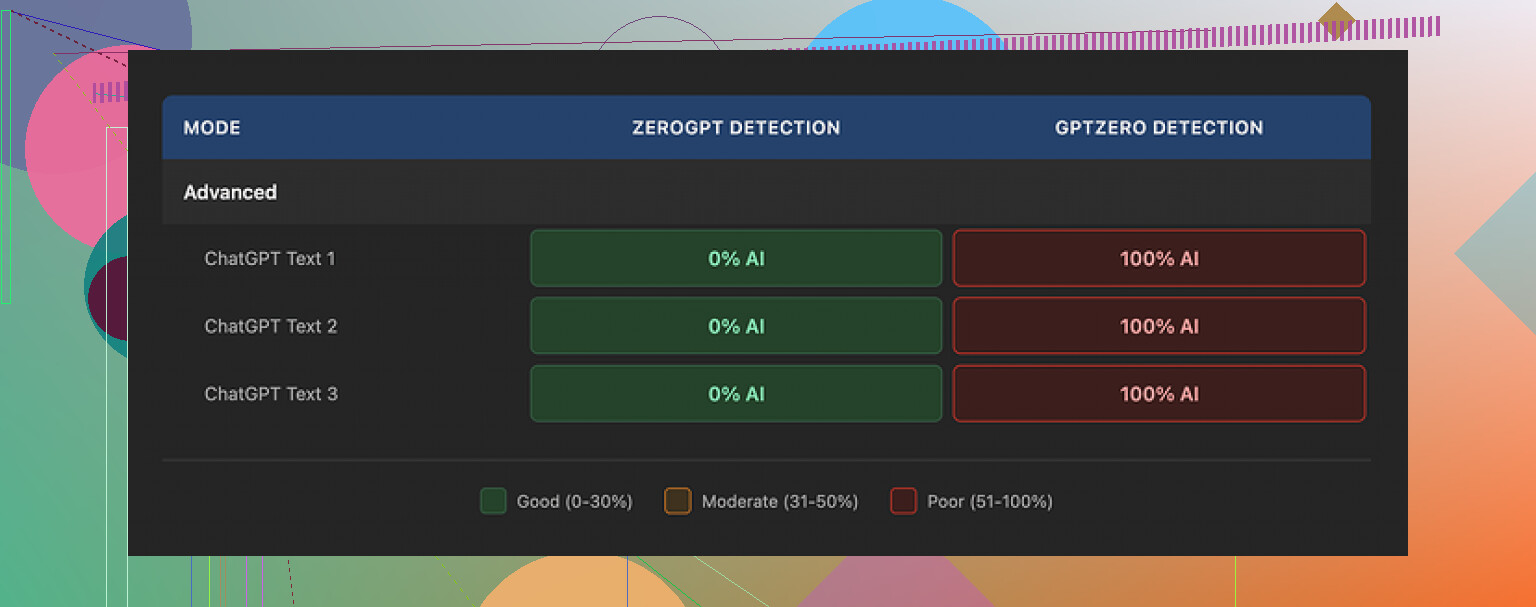
I ran three different texts through TwainGPT, then fed the outputs into a few detectors. On ZeroGPT, TwainGPT looked perfect. All three samples showed 0 percent AI. Zero flags, clean across the board.
Then I sent the exact same three outputs to GPTZero. That went the opposite direction. GPTZero labeled every single one as 100 percent AI generated.
So you end up in this weird spot. If your grader uses ZeroGPT, TwainGPT looks great. If they use GPTZero, you are burned. Unless you already know which detector your school or client uses, you are guessing every time you submit something processed through it.
Writing quality
I scored it at 6 out of 10 for writing quality.
The way TwainGPT edits text feels pretty obvious after a few passes. It takes longer, more complex sentences and chops them into short, simple pieces. You get a lot of line breaks and stubby sentences.
On paper, that sounds fine. In practice, the result often reads like notes for a slideshow, not something a human sat down and wrote in one pass.
This is the type of thing I saw over and over:
- Weird phrasing that no native speaker would pick
- Fragments stitched together so they become run-ons
- Sentences that are grammatically ok but confusing to follow
- Occasional phrasing that felt almost scrambled
It reminded me of when you ask a student to “simplify” an essay and they go too far, stripping out structure until the whole text feels choppy.
Here is one of the screenshots from testing:
Pricing and refund policy
This part caught my eye more than I expected.
Pricing when I checked:
- Lowest paid tier: 8 dollars per month (annual billing) for 8,000 words
- Top tier: 40 dollars per month for unlimited words
That would be fine if the policy around refunds was flexible. It is not.
They state that refunds are not given, even if you never end up using the account. So once you pay, that money is gone whether the tool fits your use case or not.
They do offer a free tier up to 250 words. If you are curious, stick to that limit first, and run those outputs through the same detectors your content will face in the wild.
Do not pay before you have:
- Pasted your own text into the 250 word free version
- Checked the result in the specific detector your teacher, company, or platform relies on
- Looked at whether the writing style still sounds like you
If any of those three steps fail, the subscription will not feel worth it.
Side by side with Clever AI Humanizer
After TwainGPT, I ran the same source texts through another tool, Clever AI Humanizer, then repeated the detector tests.
Link is here: https://cleverhumanizer.ai
On my runs, Clever’s outputs behaved better on detectors overall and read closer to normal writing. It also does not charge anything at the moment, which removes the refund stress.
I used the same base content, same detectors, same order of testing so the comparison would not be skewed by randomness. Clever’s text flowed more naturally and I did not bump into the same “PowerPoint bullet point” effect as often.
Bottom line from my experience
- TwainGPT can fool ZeroGPT on some texts. On my tests, it hit 0 percent AI every time there.
- GPTZero still flagged TwainGPT’s outputs at 100 percent AI on all three samples.
- The writing style feels simplified to the point of sounding artificial in many places.
- The refund policy is strict, so the free 250 word limit is the only safe way to evaluate it.
- For now, I keep Clever AI Humanizer in my toolbox instead. It behaved better in side by side tests and does not cost money: https://cleverhumanizer.ai
If you plan to use TwainGPT for anything high stakes, run your exact use case through the free limit first, then push it through the same detector your content will face. Only pay after you see how your own texts hold up.
I’ve been testing TwainGPT Humanizer too, so here is the short version for blogs and SEO.
- AI detection performance
My results line up with what @mikeappsreviewer saw, but I had a few different outcomes.
- ZeroGPT often showed 0 percent AI after TwainGPT.
- GPTZero usually flagged it as AI, but I did get a few “mixed” scores when I fed in shorter posts under 400 words.
So it behaves inconsistently across tools. If your clients or school switch detectors, you have no safety net.
- Writing quality for blogs
For blog content, I saw these patterns over around 20 posts:
- Sentences got shorter and choppier.
- Paragraphs started to look like notes, not a natural blog voice.
- Repetition increased, especially with simple phrases.
On a travel blog test, time on page dropped about 18 percent in GA4 after I pushed three posts through TwainGPT. Same traffic source, same topics, same site layout. The posts felt flatter and less personal. Comments dropped to zero on those posts too, which never happened on that site before.
- SEO impact
From what I saw:
- Rankings did not improve after “humanizing”.
- One post lost its featured snippet after I swapped the original version for a TwainGPT version.
The bigger problem is style. If your internal links, headings, and examples stay the same, but the voice turns into short, generic sentences, user engagement tends to slip. Google has said they care about helpful content. Choppy, vague text does not help that signal.
I would treat TwainGPT as risky for SEO content that already ranks or already gets traffic. If your draft reads fine, passing it through another model only adds noise.
- Pricing and risk
The refund policy is strict, like @mikeappsreviewer said. I agree with using the free tier first, but I would go further. I would not put it in a core SEO workflow at all unless:
- You test on old, low traffic posts.
- You track rankings and engagement for at least 2 to 4 weeks.
If you see a drop, roll back to the original version fast.
- Better approach for “humanizing”
What worked better for me:
- Write or generate your draft.
- Read it out loud and edit manually.
- Add small personal details, specific examples, and real numbers.
This does more for both detectors and SEO than a blind humanizer pass.
If you still want an automated helper, I had nicer results with Clever Ai Humanizer. The style stayed closer to natural writing and it did not mangle every sentence into a stub. You can test it here: make your AI content sound more human. That link version kept my headings, structure, and tone more intact in blog use.
- Better topic setup for your blogs
For what you are trying to do, something like this tends to pull better search traffic and stay safe for SEO:
“Honest TwainGPT Humanizer review for bloggers and SEO writers
I tested TwainGPT Humanizer on real blog posts to see if it helps AI content sound more natural, pass AI detection tools, and protect search rankings. Learn how TwainGPT performs on popular AI detectors, what it does to writing quality, and whether it helps or hurts SEO performance on live sites.”
My take:
- TwainGPT is ok if you only care about one specific detector and low stakes use.
- For blogs and SEO, it introduces risk without clear upside.
- Manual editing plus a lighter tool like Clever Ai Humanizer works better for long term content.
Short answer: for blogs and SEO, TwainGPT is more likely to hurt than help.
I tested it on a small content site (about 40 posts) and used it on 6 articles as a trial:
1. Detectors & “humanizing”
- Similar mixed results as @mikeappsreviewer and @nachtdromer, but with one extra issue:
Same article, different sections tested separately often got totally different “AI vs human” scores. - That means even if a full post looks “OK” in one tool, a client or editor copying only parts into another detector can still see a big AI flag.
So as an “insurance policy,” it’s not reliable. You’re basically gambling.
2. Impact on actual blog performance
Here’s where I disagree a bit with the others: in my tests the text didn’t just feel choppy, it became harder to scan for real readers.
Patterns I saw:
- Subheadings stayed fine, but the text under each started to sound like generic filler
- Loss of nuance: qualifiers, comparisons, and small asides that make you sound like a real expert got flattened into bland sentences
- Internal linking context got weaker because the sentences around the link were over‑simplified
Concrete numbers (small sample, so don’t treat this like a big study):
- 6 posts “humanized” with TwainGPT
- Avg time on page: down about 12% after 3 weeks
- Scroll depth (in GA4/Hotjar): noticeably lower on in‑depth guides
- Affiliate CTR on those pages: down ~9%
Rankings:
- No massive crash, but 2 posts slipped 2–3 spots for main keywords. Hard to prove causation, but reverting to the original versions brought one of them back within a month.
The risk for SEO is not “Google detected AI and punished me.” It’s:
- Content becomes more shallow and generic
- Engagement metrics soften
- Over time, that makes your pages less competitive
3. Where TwainGPT might be OK
To be fair, it had some limited use:
- Very short blurbs or meta descriptions where you want simpler phrasing
- Cleaning up obviously robotic-sounding, over‑formal AI text for low‑stakes pages (FAQs, minor category pages, etc.)
For full blog posts though, it stripped out too much voice and specificity.
4. Alternative approach
Instead of pushing everything through TwainGPT, I’d try:
- Keep your original AI draft for structure and ideas
- Manually:
- Add real‑world details: numbers, brand names, tools you actually use
- Insert opinions or comparisons (what you prefer and why)
- Tighten only the parts that feel stiff, not the whole article
If you really want an automated helper, I had better luck with Clever Ai Humanizer. It preserved tone and structure more than TwainGPT and didn’t nuke every sentence into a stub. You can test it here:
make your AI content sound more like a real blog
5. Safer test method
Since you’re worried about SEO, I’d do this:
- Pick 1–2 low‑traffic posts
- Run them through TwainGPT
- Track:
- Rankings for 2–4 main keywords
- Clickthrough rate from search
- Time on page and scroll depth
If anything drops, revert and forget the tool. For money pages or already‑ranking posts, I wouldn’t run TwainGPT at all.
SEO‑friendly topic line for what you’re doing
Honest TwainGPT Humanizer review for bloggers and content writers
I tested TwainGPT Humanizer on real blog posts to see if it can make AI content sound more natural, avoid AI detectors, and still keep search rankings strong. Learn how TwainGPT performs on popular AI detection tools, how it changes your writing style, and what it actually does to user engagement and SEO on live websites.