I accidentally formatted my SD card, then kept using it in my camera and took more photos before realizing what happened. I’m trying to recover the original pictures and videos, but I’m worried they may have been overwritten. Has anyone had success with SD card recovery after formatting and reuse, and what’s the best way to try without making it worse?
I did this once with a wedding shoot card, and yeah, the stomach drop hits fast.
The first move is simple. Stop using the SD card now. Do not shoot more photos. Do not record more video. Pull it out of the camera, phone, drone, whatever had it mounted. If the card has a lock switch, slide it over.
What usually happens after a format is less dramatic than it looks. Most devices do a quick format. The data is often still sitting on the card. The file table gets cleared, and the space gets marked for reuse. Your stuff tends to stay there until new data lands on top of it.
I would skip CHKDSK and random Command Prompt fixes. Those are for file system repair, not this. After a format, you want recovery software, not repair tools.
The one I had the best luck with was Disk Drill. I used it on camera footage, and it handled video better than a lot of free stuff I tested. Cheap or free tools often pull back broken clips, especially from drones, action cams, and longer recordings where files get fragmented. Disk Drill has a mode for camera video recovery, and in my case it pulled playable files instead of junk. The preview step helped too, since I could check clips before saving them.
If you want the free route, PhotoRec is still worth a shot. It works. It also feels old and rough. You’ll likely lose original names and folder layout, so expect a pile of files with no clean organization. I’ve had to sort those by date and file type afterward, which was annoying but better than losing the footage.
What I’d do, in order:
- Put the SD card in a card reader and connect it straight to your Mac or Windows PC.
- Install the recovery app on your computer’s drive, never onto the SD card.
- Scan the formatted card.
- If the lost files are videos, use the camera/video recovery mode if the app has one.
- Preview files first. Check if photos open and videos play.
- Save recovered files to another drive, not back to the SD card.
If you haven’t written new data onto the card, recovery odds are usually decent. I’ve seen cards look dead, then cough up most of the shoot. Keep the card untouched while you scan it. That part matters a lot.
Yes, recovery is still possible. Your odds depend on one thing, how much new data hit the card after the format.
A format in a camera often wipes the index, not the photo data itself. The bad part is the extra shooting after. Every new photo or video takes old space. Once blocks get overwritten, those older files are gone. No tool fixes overwritten data. Thats the hard limit.
I agree with @mikeappsreviewer on stopping use right away. I disagree a bit on expectations for video. Photos often come back in decent shape. Videos are less forgiving, esppecially large 4K clips. One overwritten section can ruin playback.
What I’d do now:
- Make a full image of the SD card first, with something like USB Image Tool or R-Studio.
- Run recovery on the image, not the card.
- Try file-system scan first, then signature scan.
- Sort results by date and size. New files from after the format will help you estimate what got replaced.
- Recover to your PC or external drive.
Disk Drill is a solid pick for formatted SD card recovery after camera use, mostly because it handles mixed photo and video cards well and gives previews. If one scan misses stuff, test a second tool on the card image, not the card itself.
Also, this guide is worth a look if you want a step-by-step formatted SD card recovery guide: watch this SD card formatted file recovery walkthrough.
Short version: some of your old files are likely recoverable, some are likely overwritten. The more you shot after formatting, the worse the outcome.
Yes, but only partially, and the ugly truth is this: recovery depends way more on how much you shot after the format than on which app you use.
I mostly agree with @mikeappsreviewer and @stellacadente, but I’d push one point harder: don’t obsess over the word formatted. On most cameras, format is not the killer. Continued use is. Every new burst, every video clip, every retry shot is basically playing roulette with the old files.
A few things people forget:
- Cameras often overwrite in chunks, so you may recover a lot of photos but lose random videos.
- RAW photos usually survive better than long video files.
- If the camera did an in-camera format and then rebuilt folders, some software will show both old and new file structures mixed together. That confuses people a lot.
- If you kept using the same card for 4K or high bitrate video, recovery odds drop fast. Like, real fast.
I’d actually avoid doing too many repeated scans on the physical SD card itself. Image it once if you can, then test tools against the image. Less stress on the card, less chance of read errors if the card was already a little flaky. People skip that step and then wonder why results change scan to scan.
Disk Drill is a reasonable choice here because it tends to do well with formatted SD cards and camera media, especially when you need previews to figure out what’s still intact. But if some files come back corrupted, that does not automatically mean the recovery app failed. It usually means those parts were overwritten already. No software does magic, despite what half the internet pretends lol.
Also, don’t put much faith in file names or folder dates after recovery. The content matters more than the metadata at this point.
If you want a related case, this thread is pretty on-point: formatted SD card recovery after taking more photos
Short version: some originals are probably recoverable, but anything overwritten by the new photos/videos is gone for good. Photos have better odds. Videos are way more hit-or-miss.
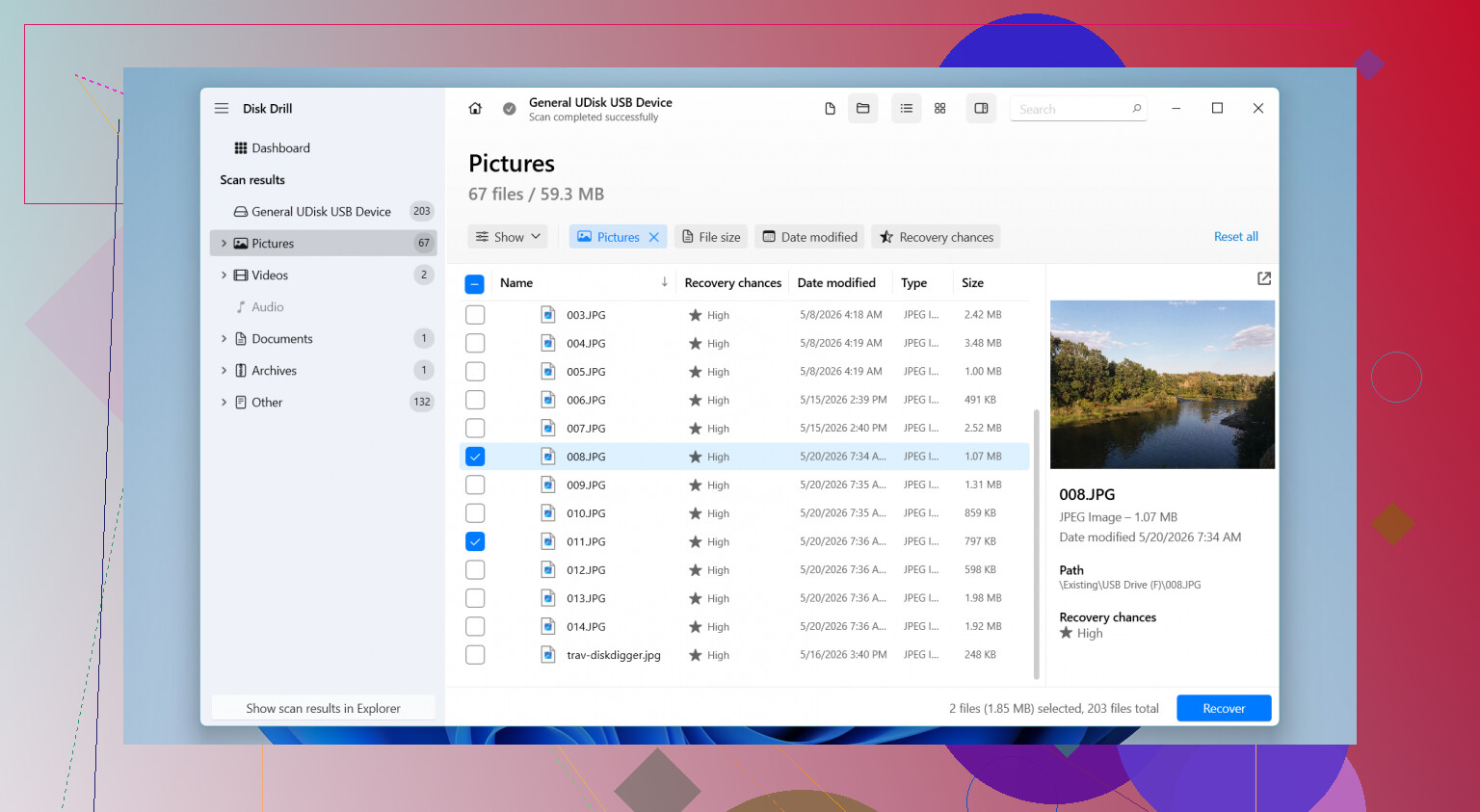
You still have a shot, but I’d be a little less optimistic than @mikeappsreviewer. Once a camera keeps shooting after a format, recovery becomes a coverage problem, not just a software problem.
One thing I’d add to what @stellacadente and @cacadordeestrelas said: check whether your camera uses exFAT and whether it tends to create sequential large video files. On those cards, photos may recover fine while videos come back as partial clips, black screens, or files that preview but die halfway through. That usually means overwrite, not bad recovery software.
My take:
- If you only took a handful of new photos, older photos may still be recoverable.
- If you recorded several minutes of video after formatting, older video losses can be brutal.
- Do not trust recovered filenames or folder structure.
Disk Drill is a sensible tool here because it previews well and is easy to sort through, especially on mixed photo/video cards.
Pros of Disk Drill:
- easy interface
- good preview support
- handles common SD card photo and video formats well
- useful for quick triage of what is intact
Cons:
- free recovery is limited depending on platform
- can return lots of duplicates from deep scans
- not the cheapest option if you only need one recovery job
What I would not do is keep trying random repair utilities. Recovery first, repair later, if needed. If a recovered video is important but damaged, sometimes a dedicated video repair tool can salvage playback after you recover the raw file. That’s worth trying for clips that almost work.
Use a professional data recovery service instead of testing more software. Remove the card, lock it, place it in a protective case, and ask for a free evaluation. Explain the camera model, card format, and how many photos or video minutes you recorded afterward.
Choose a lab offering no-data, no-fee pricing and a written file list before payment. This costs more, often $300 or higher, but saves you from setup, scanning, and damaged-video troubleshooting. For wedding, client, or family footage, this is the simplest and safest route. Dont format or test the card again.
Whether any of this works hinges on what kind of format your camera actually ran. Most cameras do a quick format that just clears the index, which is the hopeful case everyone here is describing. But some models have a ‘full’ or ‘low level’ format option buried in the menu, and a few cards will physically overwrite when you pick that. If that happened, no software gets it back and you can stop stressing over which app to buy. Worth checking your camera’s format screen and remembering which button you hit.
Assuming it was a quick format, I think @novagurux9333 jumping straight to a paid lab is overkill unless the footage is irreplaceable client work. For a personal shoot, that’s a lot of money to spend before you’ve even tried a scan yourself. The imaging advice from @stellacadente is the smart part of this thread though. Clone the card once, work off the copy, and you can throw as many tools at it as you want without wearing the card down.
On the tool itself, one thing that gets skipped in these threads is that Disk Drill can make that byte for byte image on its own, so you don’t need to bolt on a separate imaging utility just to be safe. Handy when you’d rather not juggle three programs for one job. Just point the recovery at the image afterward and keep the original card parked somewhere safe.