I accidentally deleted photos and videos from my SD card and then emptied everything before realizing I still needed them. These files are important, and I’m trying to find out if SD card data recovery is still possible after deletion and emptying it. What are the best ways to recover deleted files from an SD card without making things worse?
I messed this up once with a camera card full of trip photos, so I know the sick feeling. The first move matters more than the software.
Stop using the SD card now. Pull it out of the camera, phone, drone, whatever it is in, and leave it alone.
Deleted files on an SD card are often still sitting there. What usually gets removed first is the file system entry, not the photo or video data itself. The card then marks those spots as free space. If you shoot new clips or copy new files onto it, you risk writing over the old data. After overwrite, recovery usually fails. Thas the part people miss.
You need recovery software for this. Also, skip repair tools like CHKDSK on Windows or First Aid on macOS. Those tools are for file system repair, not undelete jobs, and they tend to clean up the exact traces you need for recovery.
https://www.youtube.com/watch?v=uhWmNUgIJTw
What I would do, step by step:
1. Use a real card reader.
Plug the SD card into your computer with a dedicated reader. I’ve had fewer weird connection issues this way than with cameras plugged in by USB.
2. Start with software that lets you preview files.
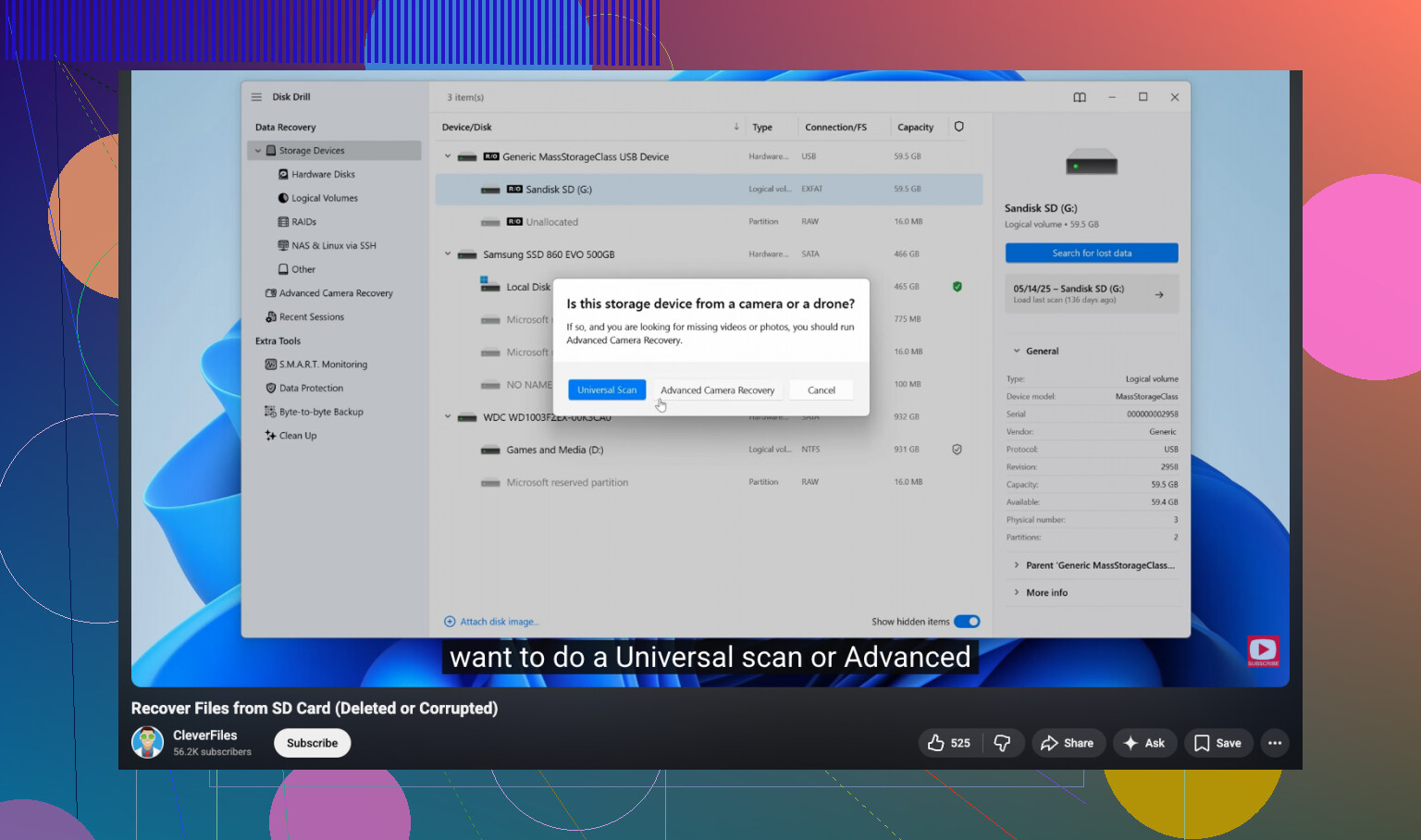
I’ve tried a pile of recovery apps over time. For SD cards, I kept coming back to Disk Drill. The useful part is the deep scan plus previews. You get to check photos and videos before restoring them, which saves time and tells you if the files are intact or half-broken.
If your missing footage came from a GoPro, Canon, or a drone, pay extra attention here. Video on those cards is often stored in fragments. A plain scan sometimes pulls pieces out of order, and the recovered file won’t play. Disk Drill has an Advanced Camera Recovery mode built for this. It tries to rebuild fragmented camera video so the result opens normally. On Windows, the free tier recovers up to 100MB, so you can test it first and see if it grabs the clips you need.
3. If you want free, expect tradeoffs.
PhotoRec is the usual no-cost option. It works. I’ve used it. I did not enjoy it. It’s command-line based, there’s no preview, and it often restores files with generic names and no folder layout. You end up with a huge pile of recovered stuff and have to sort it by hand. Good tool, rough experience.
People also bring up Recuva and Windows File Recovery a lot. Recuva is fine for simple deletes, but I’ve seen it struggle with RAW photo formats from dedicated cameras. Windows File Recovery feels narrow, and SD cards usually use FAT32 or exFAT, where its results were meh for me.
4. Recover to a different drive.
Do not write recovered files back onto the same SD card. Save them to your computer’s internal drive or to another external disk. If you recover onto the original card, you risk overwriting the same missing files while trying to save them. It sounds obvious, but people do it in a panic.
So yeah, take a breath. Get the card into a reader. Run a scan. If you haven’t recorded new footage over the old data, your odds are still pretty good.
4 Likes
Yes, SD card data recovery is still possible after you emptied it. The key factor is overwrite. If you did not take new photos, record new video, or copy files onto the card, recovery odds stay decent.
I agree with @mikeappsreviewer on one big point, stop using the card. I disagree a bit on tool choice being the whole story. Before any scan, make a byte-for-byte image of the SD card if you have the space. That gives you one safe copy to work from. If the card has bad sectors or starts disconnecting, you still have the image. On Linux or macOS, dd or ddrescue works. On Windows, USB Image Tool or similar apps do the job.
Then scan the image, not the card, if possible. Disk Drill is a solid pick for photo and video recovery from SD cards because it handles exFAT and FAT32 well and it previews files fast. For cameras, fragmented video is the pain point, so test a few clips first before you spend time on a full restore. Save recovered files to your computer, not back to the SD card. Sounds obvious, people still do it in a panic and wreck the rest.
One more thing people skip. Check file sizes in the results. If your recovered MP4 is 4 KB, its toast. If it matches the rough size you expect, odds are better.
If you want a visual walk-through, this SD card file recovery tutorial for deleted photos and videos is easier to follow than random search results.
If the card was formatted, not only deleted, recovery still works sometimes. Full overwrite is the thing thta kills it.
Yes, possibly. Emptying deleted files from an SD card usually does not instantly erase the actual photo/video data. It mostly removes the index pointing to them. So if the card has not been used much since then, recovery is still on the table.
I slightly disagree with @mikeappsreviewer and @hoshikuzu on one thing though: not everyone needs to jump straight into making an image first. If the card is healthy, readable, and you just did a normal delete, you can often go straight to scanning. Imaging is smarter for fragile cards, but it’s not mandatory for every case.
A few things that matter:
- if you took new pics or recorded over it, recovery odds drop fast
- if the card is acting weird, disconnecting, or asking to be formatted, be more careful
- do not use repair tools before recovery
- recover files to your computer, not back onto the SD card
For actual SD card data recovery, Disk Drill is one of the more practical options because it can sort through deleted photos/videos and lets you check what’s recoverable without a total mess. That matters a lot when you’re trying to find specific camera files instead of 8,000 random scraps named file0001.jpg. If you want a simple visual guide, this SD card deleted photo and video recovery tutorial is pretty easy to follow.
One more thing people forget: if your photos were ever copied to a phone or PC before, check hidden import folders, cloud backups, and editing app caches first. I’ve seen people recover stuff they thought was gone, then realize it was sitting in Google Photos, Lightroom cache, or the Windows Photos import folder the whole tiem.
Yes, still possible, but I’d add one nuance to what @hoshikuzu, @yozora, and @mikeappsreviewer said: on some SD cards, especially ones used in phones or newer cameras, TRIM-like cleanup can make recovery worse than people expect. So “deleted” does not always mean “safely recoverable later.”
What I’d do is check the card on a computer and see if it reads normally. If it does, run a read-only recovery scan first. If it behaves oddly, then clone/image it before doing anything heavier.
About Disk Drill:
Pros
- easy to preview photos and videos
- good with FAT32/exFAT SD cards
- cleaner results than a lot of free tools
- decent for finding deleted media fast
Cons
- free recovery limit on Windows is small
- deep scans can return lots of extra junk
- big fragmented videos may still come back damaged
I slightly disagree with the “always image first” camp only because a healthy card does not always need that extra step. But I strongly agree on one thing: do not write anything back to the SD card.
Also check whether your camera created low-res backups, thumbnails, or companion files. Sometimes the full file is gone, but a usable smaller version survives.
If you want the practical route, Disk Drill is a reasonable first try, then move to more specialized tools only if the results look incomplete.