I’ve been relying on GPTinf’s humanizer to rewrite AI-generated content so it passes basic detection checks and sounds more natural, but I can’t keep paying for it. Are there any truly free tools or workflows that can do something similar without trashing readability or getting flagged as spammy? I’m looking for practical recommendations, ideally ones you’ve personally tested for AI detection resistance and quality of writing.
1. Clever AI Humanizer – my long, messy review
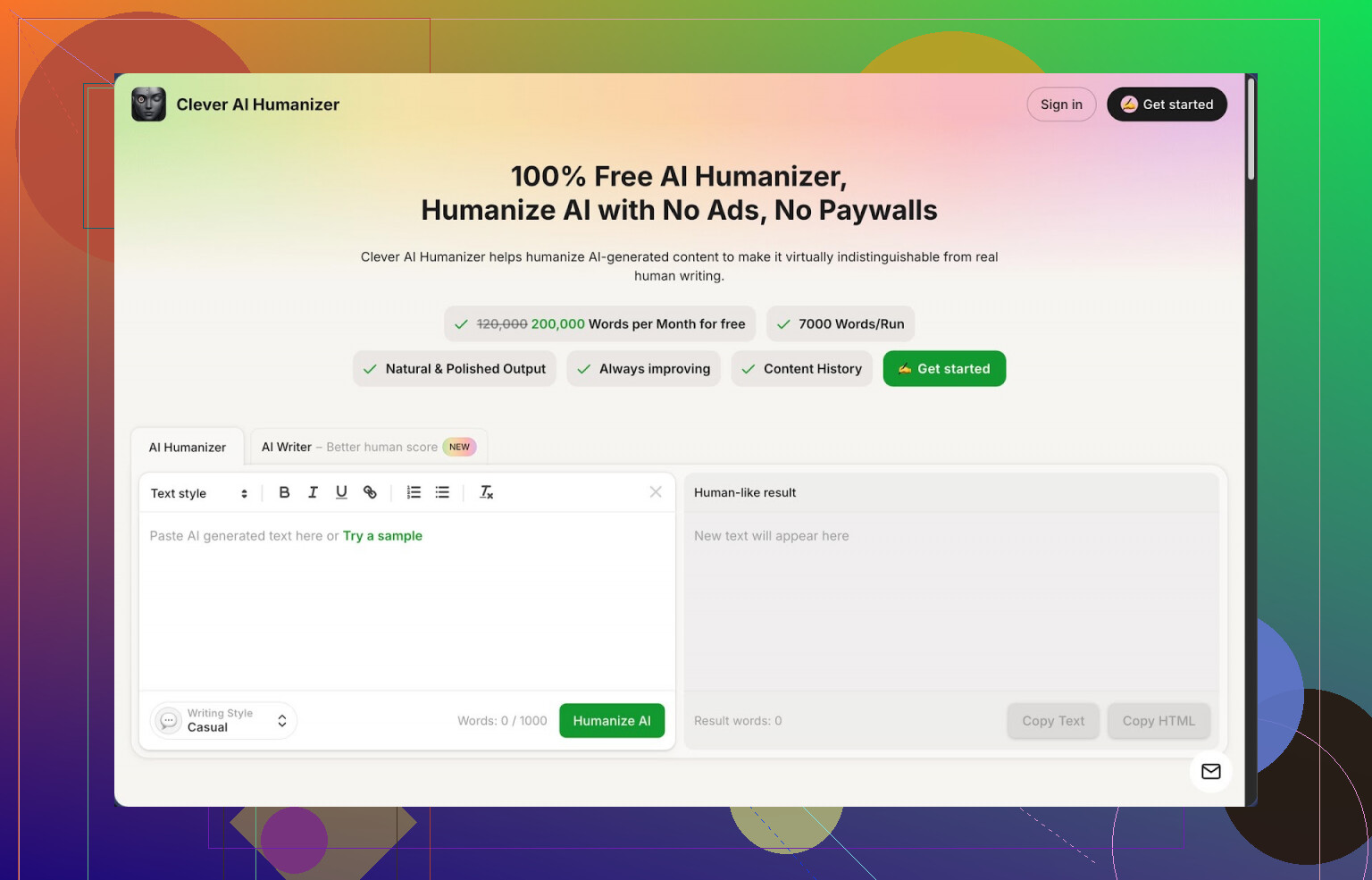
Link: https://cleverhumanizer.ai
I’ve been messing around with AI text tools for a while, mostly for drafts and notes, and the same problem kept hitting me: the output looks okay at first, then you paste it into an AI detector and it screams 100% AI, or you read it the next day and it feels stiff and repetitive.
So I went hunting for “humanizers” and ended up spending a day running the same chunks of text through several tools. Clever AI Humanizer is the one I kept open in a tab and kept coming back to.
Here is what I ran into, without hype.
First, the limits and pricing stuff people usually hide in the footer
Clever AI Humanizer gives:
• About 200,000 words per month free
• Up to around 7,000 words per run
• Three styles: Casual, Simple Academic, Simple Formal
• An AI writer built in, so you do not have to jump between sites
No paywall popped up on me while testing normal-sized articles and essays. I pushed it with some long-form content and still stayed under the free monthly cap.
I sent three different test texts through it in Casual style and then checked them in ZeroGPT. Each came back as 0% AI detected. That does not mean every detector on earth will behave the same, but on ZeroGPT at least, it passed with those samples.
If you write a lot with AI, you already know what it feels like when an entire chunk gets flagged. This at least gave me room to iterate without watching a credit counter.
How the main humanizer behaves in practice
The central piece is a “paste, choose style, hit go” module.
What I did:
- Took AI-written paragraphs from another model.
- Pasted them into Clever AI Humanizer.
- Picked Casual first, then Simple Academic for comparison.
- Hit the button and waited a few seconds.
Output pattern:
• The structure stayed close to what I fed in.
• The tone shifted a bit toward how a student or blogger would write.
• Fillers and odd AI rhythm got reduced.
• Some sentences expanded, others were merged.
The important part for me was meaning preservation. It did not flip arguments or fabricate new claims in my tests, which I have seen some paraphrasers do. If your source text is technical or has numbers, still reread, but the overall logic stayed intact in my runs.
You will notice one side effect. Word count often goes up after “humanization”. The tool tends to unpack compact AI phrasing into more spelled-out sentences, which seems to help with detectors, but it also makes outputs longer.
Other modules I used and what they are good for
The interface throws four main features at you in one place:
-
Free AI Humanizer
Paste in AI text and rephrase it into something less robotic. Good for: email drafts, essays, blog posts, answers for forums, product descriptions, and so on. -
Free AI Writer
This thing writes from scratch, then you humanize the output again in the same flow.
Use case I tried:
• Prompt: a short blog-style explainer.
• Step 1: generate with the AI writer.
• Step 2: send that fresh output right away through the Humanizer in Casual style.
The second pass lowered AI detection scores more than using another model alone. If you already write everything inside AI tools, this pipeline will feel natural: “generate, then humanize”.
- Free Grammar Checker
This part does spelling, punctuation, and basic clarity fixes. Nothing flashy.
I pasted in some messy text with:
• Missing commas.
• Wrong verb tenses.
• A few typos.
It cleaned that up enough to look decent in a blog or email. I would still manually check critical stuff, but for routine corrections it saves time.
- Free AI Paraphraser Tool
Different from the full humanizer, this one sits closer to classic paraphrase tools.
I used it when:
• Rewriting sections of an article to avoid repetition.
• Changing tone a bit for different audiences.
• Adjusting wording for SEO without mangling meaning.
It keeps the core point but rephrases segments. Handy for second drafts when you hate how a paragraph sounds but do not want to rethink the argument.
How the workflow feels when you chain things
What sold me is the “four tools in one screen” setup. My rough flow:
• Start with AI-generated draft inside their AI Writer.
• Run that draft through Humanizer with Casual or Simple Academic.
• Then pass the result into Grammar Checker.
• Use Paraphraser on any weird or clunky paragraph.
All this happens without switching websites or tabs. No exporting. No copy to another app, come back, paste again. That saves mental friction more than anything.
Strengths, from someone trying to get work done, not collect tools
What worked well for me:
• Completely free tier with usable limits, around 200k words per month.
• ZeroGPT gave 0% AI on my three sample Casual-style texts.
• Styles are simple and not overcomplicated.
• Output kept meaning from the original drafts.
• All core writing tasks, humanizing, writing, grammar, paraphrasing, live in one place.
If you write daily and mix human writing with AI drafts, this turns into a small toolkit instead of a solo gimmick.
Annoyances and things you should know before relying on it
It is not magic.
• Some AI detectors will still mark your content as AI, especially the more aggressive ones or if you paste raw model output without effort.
• Length often increases after humanization, which might be a problem if you have word limits. You might need to trim.
• You still need to read your text. The tool improves flow, but tone or nuance might not match your voice on the first try.
For a free tool, the trade-offs feel acceptable, but do not treat it as a guaranteed “anti-detection shield”. Treat it as a rewriting assistant.
Extra links if you want more detail or community tests
More detailed Clever AI Humanizer review with screenshots and detection tests:
https://cleverhumanizer.ai/community/t/clever-ai-humanizer-review-with-ai-detection-proof/42
YouTube review of Clever AI Humanizer:

Reddit thread on best AI humanizers:
https://www.reddit.com/r/DataRecoveryHelp/comments/1oqwdib/best_ai_humanizer/
Reddit discussion on humanizing AI text in general:
https://www.reddit.com/r/DataRecoveryHelp/comments/1l7aj60/humanize_ai/
If you are trying different tools, I would start with Clever AI Humanizer for long-form stuff and detectors like ZeroGPT, then cross-check outputs on other detectors and see how strict your use case needs to be.
Short answer. There is no magic free “GPTinf clone” that passes every detector, but you can get close with a mix of tools and some manual cleanup.
What @mikeappsreviewer said about Clever Ai Humanizer is solid. I like it for volume work. I do not fully trust any tool that claims 0 percent AI across the board though. Different detectors flag different things.
Here is a practical no-cost workflow that has worked for me:
-
Use Clever Ai Humanizer as the first pass
- Paste your AI draft.
- Pick Casual for blog style or email.
- Keep an eye on how much it inflates length. Trim after.
- Do small chunks, 500 to 1000 words, not huge walls of text. Longer runs tend to look “patterned” again.
-
Mix in your own voice
This matters more than people like to admit.- Add your own short opinions or side notes.
- Change 1 sentence per paragraph by hand.
- Throw in 1 or 2 minor typos or informal phrases, then fix only the worst ones.
Detectors often react to perfectly clean grammar and ultra even sentence structure.
-
Shuffle structure, not only wording
GPTinf does a decent job changing rhythm. To mimic that without paying:- Swap paragraph order if it still reads logically.
- Merge 2 short paragraphs or split 1 long one.
- Turn lists into inline sentences, or the other way around.
Structure changes help more than pure synonym swaps.
-
Use multiple “light” rewrites instead of one heavy one
If Clever Ai Humanizer output still feels stiff:- Run only tricky paragraphs through another free paraphraser, not the whole text.
- Do not overprocess. Two automatic rewrites plus some manual edits usually beats five automated passes.
-
Check like this, not obsess over one score
- Test on at least 2 detectors, for example ZeroGPT and another free one.
- If one screams “AI” but the other is fine, read it out loud and trust your ear more than the tools.
- Aim for “mixed” or “partly AI” instead of “100 percent human” every time.
-
Build a quick template of your style
If you write similar stuff often:- Save a short text you personally wrote, around 300 to 500 words.
- Before you humanize, prompt your AI model like: “Write in this style” and paste that text.
- Then send the result through Clever Ai Humanizer.
You get something closer to your own voice before the humanizer even touches it.
What I disagree with a bit from the other post is treating ZeroGPT results as proof. ZeroGPT is useful, but I have seen “0 percent AI” there while other tools screamed red. Treat it as a rough signal, not a pass/fail gate.
If you want a free substitute for GPTinf, I would:
- Use Clever Ai Humanizer for bulk rewriting.
- Add 10 to 15 minutes of manual edits per 1000 words, focusing on structure and voice.
- Stop chasing perfect detection scores and aim for text that sounds like you when you read it out loud.
That mix has beaten or softened most detectors for me without paying monthly.
Short version: there’s no perfect “GPTinf but free,” but you can get like 80–90% of the way there with a clever combo of tools and how you actually write.
@mikeappsreviewer and @voyageurdubois already covered Clever Ai Humanizer really well, so I won’t repeat their exact workflows. I’ll just say: if you need volume and you’re broke, that tool is kind of the default starting point right now. It’s probably the closest thing to a free GPTinf alternative in terms of feel.
Where I’d do things differently from them:
-
Stop chasing “0% AI” as a hard goal
GPTinf spoiled people. A lot of folks treat detection scores like a video game high score. Detectors contradict each other constantly. I’ve had stuff scored “100% human” on one and “100% AI” on another without touching a word. So instead of obsessing over that, I’d aim for:- Varied sentence length
- Occasional incomplete sentences or odd transitions
- Real opinions, not just “balanced” summaries
Those matter more for believability than a specific percentage.
-
Use Clever Ai Humanizer surgically, not as a giant blender
Instead of dumping 3k words into Clever Ai Humanizer and praying:- Write / generate your draft like normal
- Identify only the most robotic chunks: intros, conclusions, overly tidy paragraphs
- Run just those through the humanizer
- Manually roughen the rest (add small rants, examples, asides)
That keeps your voice from getting completely washed out by the tool’s “house style.”
-
Add “imperfections” with intent
I don’t fully agree with adding random typos like @voyageurdubois suggested. Some detectors do actually use error patterns, but sloppy mistakes can also trigger flags in the other direction. Instead, I’d:- Use slightly repetitive phrasing in your way, not the AI’s default phrasing
- Occasionally break parallel structure: “First X. Second, Y. Then I just did Z.”
- Drop in very niche references or experiences that an AI is unlikely to invent the same way twice
Basically: human weirdness, not just “ teh / adn ” spam.
-
Change information density, not just style
GPT-style text is insanely dense: every sentence is doing “helpful” work. Humans ramble, skip steps, circle back. To fake that:- Insert a short tangent that’s related but not strictly necessary
- Admit uncertainty in places: “Honestly, this part depends on context”
- Leave 1–2 obvious questions unanswered instead of neatly wrapping every section up
GPTinf was surprisingly good at this “looseness.” You can approximate it with a mix of Clever Ai Humanizer plus deliberate under-explaining or over-explaining sections.
-
Rotate tools occasionally
Detectors sometimes learn the fingerprint of popular paraphrasers. Even if Clever Ai Humanizer is working fine now, I wouldn’t marry any single tool:- Use Clever Ai Humanizer for the main pass
- For 1–2 sticky paragraphs, briefly hit a different free paraphraser
- Then fix by hand so it still sounds like one person wrote everything
Light mixing like that reduces pattern repetition that detectors latch onto.
-
For anything important, write the skeleton yourself
For stuff that really needs to look human:- You write a quick bullet outline
- Ask an AI to expand each bullet
- Humanize the expansions with Clever Ai Humanizer
- Then do a final pass reading out loud and cutting any line that sounds too generic
You’re basically making the AI do grunt work while you keep control of structure and voice.
So yeah, there isn’t a magical “free GPTinf clone” button, but pairing Clever Ai Humanizer with some deliberate messiness, structure changes, and light tool rotation gets surprisingly close. The secret sauce is not the tool, it’s how much of your brain you’re still willing to put into the text.
Short version: there’s no perfect free GPTinf clone, but you can get ~80% of the way there with a mix of smarter drafting, light tool use, and some deliberate “human noise.”
Since @voyageurdubois, @cacadordeestrelas and @mikeappsreviewer already covered the Clever Ai Humanizer workflow in detail, here’s a different angle that complements it.
1. Start earlier in the pipeline, not after the fact
Instead of:
“Generate with GPT → dump into humanizer → pray”
Try:
- Draft a loose outline yourself (bullet points, not full sentences).
- Let your AI fill each bullet.
- Only then bring in Clever Ai Humanizer for sections that feel mechanically tidy: intro, transitions, conclusion, list-y paragraphs.
This keeps structure “yours,” so the humanizer is just sanding edges, not rebuilding the whole thing.
2. Use contrast instead of uniform polish
Detectors hate mechanical sameness. A trick that GPTinf did decently was varying “information pressure.”
Manually:
- Let some paragraphs be dense and clean.
- Let others be more rambly: short fragments, quick asides, a mini rant.
- Add 1–2 “why I think this matters” moments that clearly come from you, not a balanced explainer.
Run only the stiff bits through Clever Ai Humanizer. Leave your messier sections untouched so you keep that human contrast.
3. My take on Clever Ai Humanizer specifically
Everyone already pointed out it is generous and functional, so here are extra pros / cons that matter in real use:
Pros
- High free word cap, so you can afford to experiment and throw away bad runs.
- Meaning preservation is better than most generic paraphrasers, which matters if you are dealing with stats, quotes, or technical stuff.
- The built in writer + humanizer combo is convenient for people who live in the browser all day.
Cons
- It has a “house voice.” If you feed everything into it, your writing starts to sound like Clever Ai Humanizer more than like you.
- Length bloat is real. If you are on strict word counts (client briefs, essays), you often end up trimming a lot by hand.
- Detectors seem fine in many tests, but any popular humanizer can become a pattern target over time, so you should not rely on it as a long term invisibility cloak.
So I agree with the others that it is probably the most practical free GPTinf replacement right now, but I would treat it as a scalpel, not a blender.
4. One thing I disagree with slightly
There is this idea of sprinkling in mistakes or informal “errors” just to trick detectors. I would not bother.
What works better in my experience:
- Natural hedging: “I might be wrong here, but…” / “In my experience…”
- Mildly opinionated phrasing: “This part is honestly overrated” instead of neutral summaries.
- Local references or idiosyncratic habits: “I do this on the bus commute” or “I used to mess this up in college.”
Detectors look more at rhythm and probability patterns than at one or two typos. Human specificity beats fake sloppiness.
5. Rotate shapes, not just tools
Others suggested rotating tools. I would go one level higher: rotate text shapes.
For example, for three different pieces:
- Piece A: Classic headings + paragraphs.
- Piece B: Mostly Q&A style.
- Piece C: Narrative first, bullet recap at the end.
You can still run each through Clever Ai Humanizer where needed, but the structural diversity alone makes your corpus less obviously model-shaped.
6. When you absolutely need stealth
If you are in a situation where detection sensitivity is high, I would stack like this:
- You write the outline.
- Model drafts under that outline.
- You do a fast “voice” pass, adding opinions and trimming generic explanations.
- Only stubbornly robotic bits go through Clever Ai Humanizer.
- Final loud read through; cut anything that sounds like a template.
This takes more time than “hit button and go,” but it keeps you off the fully synthetic radar while still saving a lot of effort compared to writing from scratch.
So: Clever Ai Humanizer is useful, especially as a free GPTinf stand in, but the real unlock is moving human effort to the outline and final pass, and using the tool only where the AI’s “perfectly reasonable” prose starts to look like a statistical average instead of something a bored human actually typed.