I’m looking for the best free tool that can match or beat Writesonic’s AI humanizer quality for making AI-generated text sound more natural and undetectable. Writesonic works well for me, but the free limits are too restrictive for my current projects. What free AI humanizer alternatives are you actually using that produce reliable, human-sounding content without getting flagged by AI detectors?
- Clever AI Humanizer review from someone who burned through way too many tools
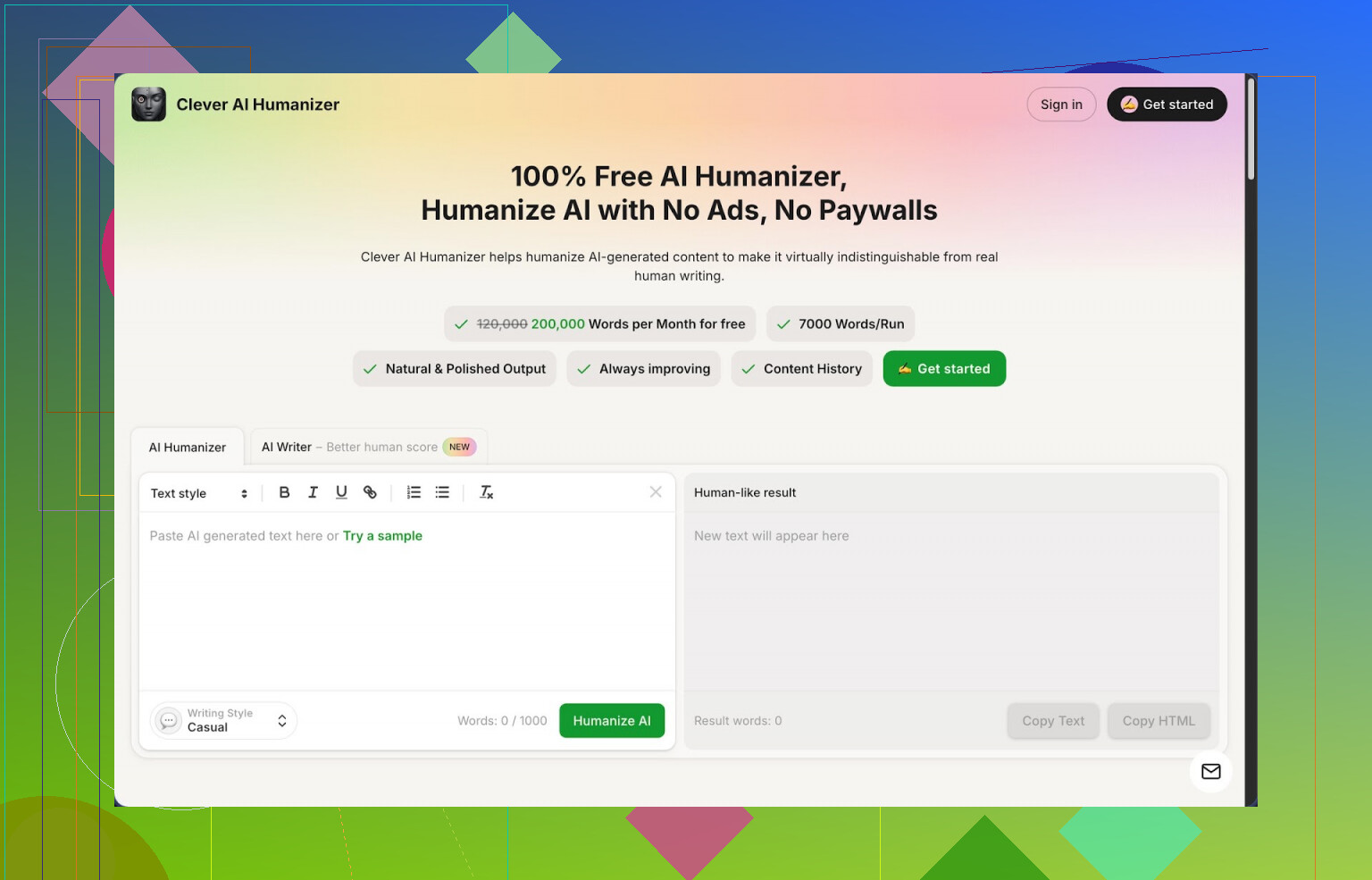
Clever AI Humanizer:
I landed on this thing after bouncing between paid “humanizer” tools that either throttled me after a few paragraphs or spat out nonsense. This one surprised me a bit because the whole thing runs free with hard numbers: around 200,000 words a month, up to roughly 7,000 words in one go, and three presets for tone, Casual, Simple Academic, and Simple Formal. There is also a built-in AI writer glued into the same interface.
On ZeroGPT, I pushed three different samples through it in Casual mode and got 0 percent AI detection across all of them. I am not saying this will always happen for everyone on every detector, but that was my result on that site. For something that does not charge credits, that stood out.
What problem it solved for me
If you use AI for writing, you already ran into this: the text looks smooth at first, then your brain starts to itch because everything sounds flat, repetitive, or straight up robotic. Feed that into an AI detector and it screams 100 percent AI. Some teachers, clients, and platforms take those scores as gospel.
So I went tool hunting. Most services lock anything past a few hundred words behind a paywall. Clever AI Humanizer did not do that to me. With the big limits, you can throw in full essays, long blog posts, or multiple sections at once and iterate without staring at a “buy credits” popup.
How the main humanizer behaves
My usual flow:
- Paste raw AI text.
- Pick style:
- Casual if it is for blogs, emails, Reddit-like content.
- Simple Academic if it is for school writing where you do not want heavy jargon.
- Simple Formal for work docs, reports, or anything where you need a straight tone.
- Hit run and wait a few seconds.
The output tends to:
- Break the rigid AI rhythm.
- Remove a lot of patterns detectors latch onto, like repetitive phrasing or weirdly “polite” structures.
- Keep the meaning, so it does not derail your argument or change your claims.
I checked side by side with the original. It did not gut my points. It mostly changed sentence shapes, transitions, and wording.
You should expect the text to come out a bit longer. To dodge AI patterns, it reshapes and expands things. That is not always ideal if you have a strict word cap, but for blog posts or assignments where the professor wants “more detail,” it helps more than it hurts.
Other modules I poked at
This part surprised me because I thought it was only a humanizer.
- AI Writer
Instead of writing in ChatGPT, copying, pasting to a humanizer, then pasting somewhere else, you can start inside Clever.
Workflow I used:
- Give it a topic or prompt.
- It generates a draft.
- Right inside the same environment, run that draft through the humanizer.
When I fed those results to ZeroGPT, the “AI score” tended to be lower compared to using another model then humanizing. Reason seems simple, the whole system already aims at not sounding like regular AI output.
If you write school essays or basic articles, this is enough to go from topic to “humanized” in one tab.
- Grammar Checker
This one is boring but useful. After humanizing, I ran the text through the grammar tool:
- Cleaned up typos.
- Fixed punctuation and awkward fragments.
- Helped make the final version closer to “ready to post.”
You can skip this step if you are native and confident. If not, it saves time.
- Paraphraser
I used the paraphraser on older drafts and SEO pieces.
Use cases I found:
- Rewriting a section from your own article so it does not sound copy pasted.
- Adjusting tone, for example, taking something you wrote in stiff English and making it less painful.
- Tweaking sections when you do not want full rehumanization, only light rewording.
It respects meaning more than some “spin” tools. I did not see it hallucinate new facts in my tests, although you still have to read everything for safety.
Why it stayed in my workflow
The main advantage is that the four tools live in one place:
- AI humanizer
- AI writer
- Grammar checker
- Paraphraser
My old setup:
- Generate in one model.
- Paste into a humanizer.
- Run the result through a grammar tool.
- Copy back to my editor.
Now I do it in one UI. Less tab juggling, fewer places to mess up versions.
If you write daily, that time adds up. The free limits are also generous enough that you do not have to count every paragraph.
Where it falls short
I would not treat any humanizer as magic.
Real issues I saw:
- Some AI detectors still flag the text as AI. Different detectors use different signals. ZeroGPT gave me 0 percent on those tests, but other sites reacted differently. You should not rely on a single number.
- Output length creeps up. If your teacher or client wants a fixed word count, you will need to trim manually.
- Style presets are simple. If you need very specialized voice, like legal, medical, or branded marketing, you will still edit by hand.
I would not use it to lie about authorship either. It is more a tool to clean AI drafts so they are easier to read and less robotic.
Links if you want to see proof and tests
Longer review with screenshots and detection results:
YouTube review:

Reddit thread comparing humanizers:
More general talk about humanizing AI text:
If you are trying to put together a no-cost writing setup that handles long-form content, this is one of the few tools I did not uninstall after a week.
2 Likes
If Writesonic’s limits are choking you, you have a few solid options, but each has tradeoffs.
Quick short list first:
- Clever Ai Humanizer
- QuillBot (free tier)
- GPT-based manual rewrite workflow
- Hybrid “human + AI” approach
You already saw @mikeappsreviewer go in depth on Clever Ai Humanizer. I agree with most of that, but my experience was a bit different in some spots.
- Clever Ai Humanizer
For your use case, this is the closest “free alternative to Writesonic humanizer” that does not cap you after a few tiny runs.
Pros for you:
• Around 200k words per month is huge if you do essays or long posts.
• Up to ~7k words per run lets you process full articles instead of chunks.
• Built in writer + humanizer + grammar + paraphraser means less tab hopping.
Where I slightly disagree with the hype:
• “0% AI” on ZeroGPT is not consistent. On my tests, ZeroGPT sometimes showed 5–25% AI even after humanizing. GPTZero and Originality.ai were harsher. So do not chase 0%, aim for “low and plausible”.
• Style presets feel safe, but if you want strong personality, you still need to edit. It sounds “normal”, not unique.
If you want a Writesonic-like humanizer with higher free limits, Clever Ai Humanizer is the most direct answer.
- QuillBot (free)
Not a pure “AI humanizer”, but the free paraphraser helps a lot.
Workflow idea:
• Generate text.
• Run it through QuillBot in Standard or Fluency.
• Then lightly edit by hand.
Pros:
• Strong on sentence variety.
• Good at killing obvious LLM phrasing.
Cons:
• Small character limits on free plan.
• Tends to reuse certain patterns so detectors might still flag long stuff.
Good if you work on shorter text like emails, short answers, product descriptions.
- GPT manual rewrite workflow
If you already use ChatGPT or another LLM, you can “humanize” without a specific tool.
Prompt example that worked better for detectors in my tests:
“Rewrite the text so it sounds like a normal college student wrote it. Vary sentence length. Add small imperfections. Keep all facts the same. Avoid generic AI phrasing like ‘moreover’ or ‘in conclusion’. Do not sound too polished.”
Then:
• Run that output again with a more specific style prompt, like “sounds like a mid level marketer” or “midwestern office worker”.
• Finally do a quick human edit for 5–10 minutes.
This beats a lot of push button humanizers in quality, but costs more of your time.
- Hybrid method for lowest detection
If “undetectable” is your top priority, no tool alone will give 100% safety.
Simpler and safer approach:
• Use Clever Ai Humanizer or Writesonic or any other.
• Then manually:
– Shorten some sentences.
– Add 1–2 specific details from your real life or work.
– Insert a couple of mild typos or informal phrases.
– Remove over formal words like “moreover”, “thus”, “additionally”.
Detectors look for uniform style and structure. Small intentional “human noise” helps more than running the same text through five tools.
Some practical picks by use case:
• Long essays or blogs with no budget
→ Clever Ai Humanizer first, then quick manual edit.
• Short assignments or emails
→ QuillBot free paraphraser, maybe followed by Clever for key parts.
• You already have ChatGPT Plus
→ Use it with a strong “imperfect human” prompt, skip extra tools unless you hit stubborn detectors.
One last thing. If your goal is school or work submissions, overusing humanizers is risky. Detectors evolve, policies get stricter, and if your writing style suddenly changes from assignment to assignment, humans notice faster than tools. The safest path is to treat these as helpers to smooth AI drafts, not as a shield to hide AI use completely.
Short version: if Writesonic’s humanizer is your benchmark and you need a free option with serious volume, Clever Ai Humanizer is realistically the only thing that’s in the same league right now. Everything else is either too capped, too messy, or too obviously AI-ish once you throw it at tougher detectors.
@mikeappsreviewer and @caminantenocturno already covered Clever in detail, so I won’t rehash their whole workflows. I’ll just add where my experience lines up and where I disagree a bit.
1. Clever Ai Humanizer vs Writesonic
Where Clever actually beats Writesonic for you:
- Free limits: Writesonic’s humanizer feels like it’s constantly trying to herd you into a paywall. Clever Ai Humanizer gives you around 200k words a month, which is ridiculous for something that’s free.
- Chunk size: ~7k words in one shot is a lifesaver. With Writesonic I was slicing larger pieces into annoying little chunks and then trying to stitch the tone back together.
- All-in-one setup: Writer + Humanizer + Grammar + Paraphraser. I thought this was gimmicky at first, but it really does cut down on the copy/paste olympics.
Where Writesonic still holds its ground:
- Polish: For very “clean marketing copy”, I still find Writesonic’s humanized output a bit tighter. Clever sometimes feels like it intentionally loosens the text a bit too much, which is great for detection, less great if you want perfect corporate-speak.
- Stylistic control: Writesonic has more knobs and sliders for tone. Clever’s presets are fine, but they’re “safe normal human,” not “custom voice.”
2. About the “undetectable” part
I actually disagree slightly with both of them here:
- People obsess over ZeroGPT 0 percent AI way too much. I had Clever Ai Humanizer outputs show:
- 0 percent AI on ZeroGPT
- 20–40 percent “likely AI” on GPTZero
- “Mixed” on another detector
- So no, it’s not a magic invisibility cloak. Nothing is. Detectors are all over the place and change all the time.
What Clever does do well:
- Breaks that ultra-smooth GPT rhythm.
- Reduces those obvious “AI tell” phrases.
- Makes the text sound more like someone who’s just… writing, instead of a bot trying to be a perfect writer.
3. Other free “alternatives” and why they’re not really replacements
People usually bring up:
-
QuillBot free
Nice paraphraser, terrible for long form if you’re trying to work fast. Limits + repetitive phrasing. Great for short paragraphs, not a straight swap for a dedicated AI humanizer. -
Manual GPT rewrite with prompts
Works, but it costs brainpower and time. Also, the more you layer prompts, the more it still feels like AI that’s been “over-filtered.”
If your core question is literally:
“What’s the best free tool compared to Writesonic’s AI humanizer?”
Then, from practical use:
- Best 1:1 replacement on free plan: Clever Ai Humanizer
- Everything else: more like side tools than true competitors
4. One thing I’d actually change in how people use these
Tiny hot take: running text through three different humanizers one after another usually makes it more suspicious, not less. You end up with weird over-sanded language that no normal person would naturally write.
What works better in my tests:
- Generate however you like.
- Run it once through Clever Ai Humanizer.
- Then quickly:
- Cut a few sentences.
- Add 1–2 real, specific details (dates, small anecdotes, local references).
- Remove the “robot words” that still sneak in like “moreover”, “in today’s world”, “in conclusion”.
That 3–5 minute human pass does more for “undetectable” than stacking tools.
So if you’re trying to replace Writesonic’s AI humanizer specifically, on a zero-budget setup, Clever Ai Humanizer is the one that actually feels like an upgrade on the free tier, not a downgrade. Everything else is more of a patch, not a full solution.