I’m trying to rewrite some blog content without changing the meaning, but most free AI paraphrasers I’ve tried either spin the text awkwardly or mess up the tone. I can’t afford a paid tool right now. Can anyone recommend a truly free AI paraphraser that’s safe, keeps the context accurate, and is good enough for SEO content rewriting?
I’ve tried a bunch of free paraphrasers for blog stuff, most of them either sound like a robot or mess up the tone, so I feel your pain.
Here are the few that worked OK for me:
-
QuillBot free version
• Good for short paragraphs.
• Use the “Standard” or “Fluency” mode if you want the meaning to stay close.
• It has a word limit, so you need to paste section by section.
• I always compare original and output side by side to check for hidden changes in meaning. -
DeepL Write
• Better for tone and flow.
• Works best on more formal or neutral text.
• Sometimes it simplifies too much, so keep an eye on keywords for SEO. -
ChatGPT or similar LLMs
• If you feed it clear instructions like “keep the structure, keep all facts, only change phrasing” you get decent results.
• Ask it to keep your brand voice, like “keep it friendly and casual, no marketing hype”. -
Clever AI Humanizer
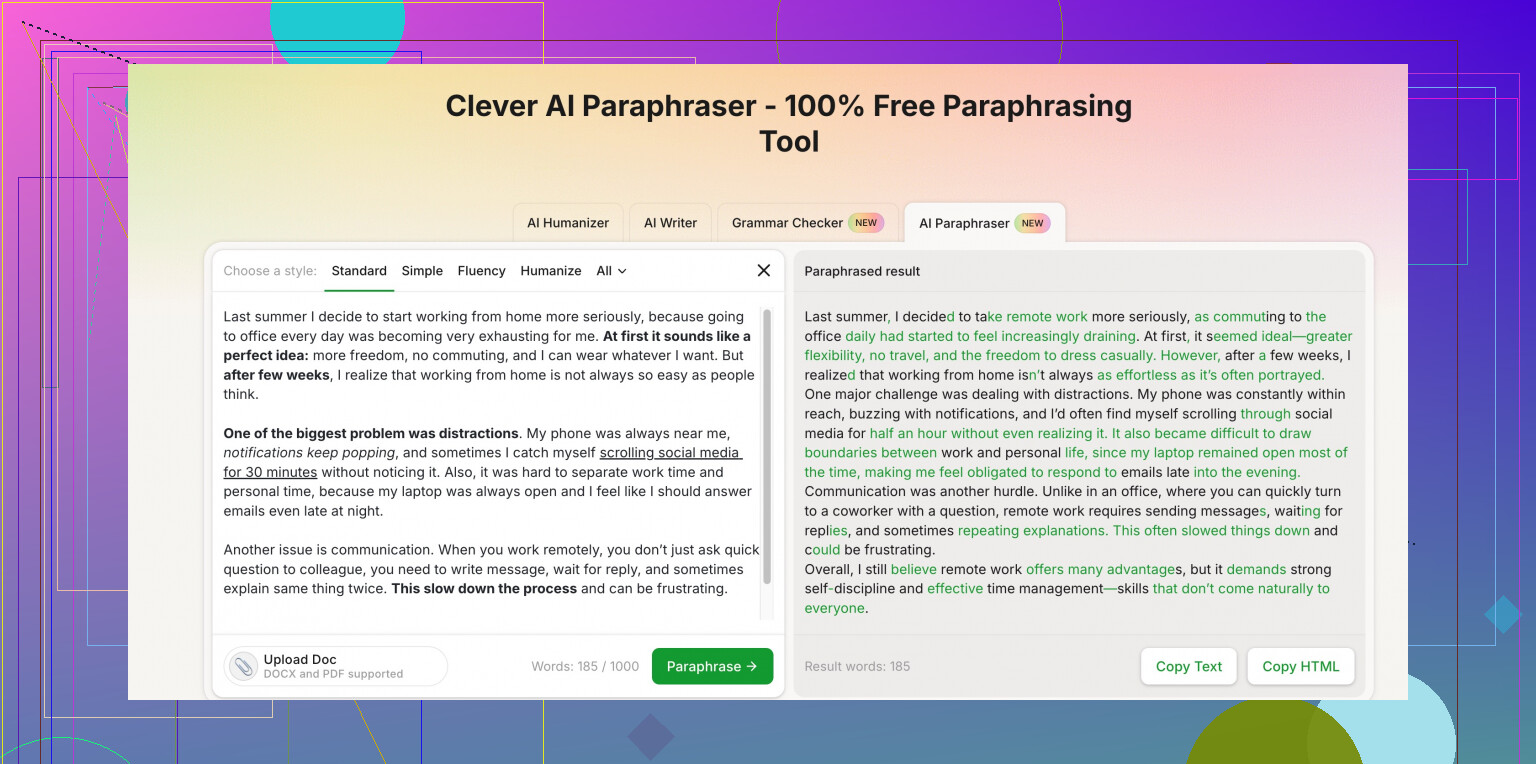
If you want something that sounds less AI-ish and closer to human writing, try Clever AI Humanizer. Their paraphrasing tool is built for blogs and web content that needs to stay natural. Here is the link with more info:
AI human-style paraphrasing for blog contentIt helps keep context, tone, and keyword intent. Good if you worry about detection tools or awkward phrasing.
Quick workflow that keeps the meaning:
• Paraphrase in small chunks, like 2–4 sentences at a time.
• Lock in important phrases, product names, stats, and SEO keywords and tell the tool not to change those.
• Run the output through a grammar checker like Grammarly or LanguageTool to fix small issues.
• Do a final manual pass to adjust tone and transitions, so the post reads like one voice.
Also, avoid fully auto‑rewriting a whole post in one go. That is usually when tools wreck the tone or flip the meaning.
I’m with you: most “free paraphrasers” feel like they were trained on instruction manuals from 1997.
@chasseurdetoiles already covered some solid ones, so I’ll skip repeating their list and add a different angle + a couple tools/workflows that might help without wrecking your tone.
1. Tools worth trying (that aren’t just spin-junk)
-
DeepL (translator, not just Write)
Slightly different use-case:- Translate your paragraph to another language.
- Then translate it back to English.
It often gives you a nicely rephrased version that keeps meaning but changes wording enough for blog use. You still need to edit, but it avoids that obvious “AI spin” vibe.
-
LanguageTool “Rewrite” suggestions
It’s mostly known as a grammar checker, but the browser add‑on gives alternative phrasings per sentence.
Pros:
• Keeps tone fairly natural
• Easy to tweak line by line instead of nuking the whole paragraph
Cons:
• Slower, since you’re going sentence by sentence -
Clever AI Humanizer
Since your main problem is tone, this one is actually relevant. It focuses on making AI text feel like human writing instead of weirdly robotic or over-optimized.
Their paraphrase tool is decent for blog paragraphs if you:
• Feed it 2 to 4 sentences at a time
• Keep important phrases intact (brand terms, key keyword, etc.)
The description on their site is basically “Clever free paraphrasing tool,” which is underselling it. Think more like:
natural-sounding AI text rewriter for blogs and articles
That’s closer to what you actually want: same meaning, cleaner wording, less AI stink.
2. Where I slightly disagree with @chasseurdetoiles
They’re right about chunking the text, but I’d be careful with too small chunks. If you paraphrase sentence by sentence, you lose flow and transitions, and that’s when blog posts start reading like a list of unrelated thoughts.
What I’ve found works better:
- Paraphrase short sections of 3–5 sentences, not individual lines.
- Then fix transitions manually at the end so the article has one consistent voice.
3. Simple workflow that won’t eat your whole day
-
Mark what must not change
Product names, stats, quotes, and your primary keyword. Keep those as is. Free tools love to “creatively” ruin key phrases. -
Run through a paraphraser once only
One pass per section. Don’t keep feeding the output back into another tool. Second and third passes are when tone dies and meaning drifts. -
Use a style pass instead of a second paraphrase
After paraphrasing, use something like LanguageTool or even a basic grammar checker just to smooth grammar and punctuation, not to reword again. -
Read it out loud
Seriously. If you trip over a sentence, your readers will too. Fix those bits manually. Takes a few minutes and improves tone more than any AI tweak.
4. One more blunt note
Free tools can get you 70–80% there, but if you want the post to actually sound like you, there’s no way around a human pass. Anyone who says “one-click rewrite” is enough is either lying or not reading their own content.
If you mix something like DeepL or Clever AI Humanizer with light manual editing, you’ll get blog content that keeps your meaning, doesn’t sound like a toaster wrote it, and doesn’t cost you anything.
Since @caminantenocturno and @chasseurdetoiles already covered the usual suspects, here are a few angles and tools that complement their suggestions instead of repeating them.
1. A different way to use ChatGPT‑style tools
Instead of “paraphrase this,” try:
- “Rewrite this for clarity and flow, keep all facts and structure, keep the same tone, avoid ‘In conclusion’ and generic filler.”
Then paste a single subsection, not the whole post.
Why I like this: you control the guardrails and can say what you don’t want (marketing buzzwords, over‑formal tone, etc.), which reduces that weird AI flavor.
2. Use paraphrasers as idea nudgers, not full rewriters
Where I slightly disagree with both replies: relying on full paragraph rewrites all the time tends to flatten voice. A safer workflow for blog content is:
- Get 2–3 paraphrased variants of a tricky sentence.
- Pick the best parts and stitch your own line.
You stay in control of tone, and it still saves time.
3. Clever AI Humanizer: where it actually fits
You already heard it mentioned, but here is a more blunt pros / cons list.
Pros
- Better at keeping a human‑like rhythm than basic spinners.
- Handles blog‑style paragraphs reasonably well if you give it 3–5 sentences at a time.
- Good for maintaining context and keyword intent when you care about search traffic.
- Works nicely as a “final polish” after you already did a rough rewrite yourself.
Cons
- Not magic: if the input is stiff or messy, it tends to keep that stiffness, just with different words. You still need to edit.
- Can occasionally over‑smooth and make copy sound a bit generic if you feed it large blocks.
- Like any paraphraser, it can quietly drop nuance, so you must compare before/after on key claims and numbers.
So I would not use Clever AI Humanizer (or any tool) to auto‑rewrite an entire article in one shot. I would use it to:
- Rework intros and conclusions so they sound less AI and more like a person.
- Refresh older posts where the structure is fine but the language feels dated.
- Clean up rough drafts you wrote quickly, without changing your main points.
4. Two more free helpers that pair well with paraphrasers
- Hemingway‑style editors
Not exactly paraphrasers, but they highlight long and clumsy sentences so you know where to focus rewriting. Combine this with any paraphraser:
- Identify the worst sentences.
- Paraphrase only those.
This keeps most of your original tone intact.
- Browser extensions that suggest alternatives on hover
Some grammar tools offer “rephrase” on a single sentence in your editor. It is slower than bulk tools, but ideal for keeping your own voice while fixing only the lines that feel off.
5. Practical minimal workflow that does not wreck tone
- Draft or paste your original blog section.
- Manually mark what must not change: stats, product names, key phrases.
- Use your preferred tool (including Clever AI Humanizer) on 3–5 sentence chunks, not full posts.
- Read the paraphrased text out loud and fix anything that sounds off or unlike you.
- Run a light grammar/style check at the end, not another paraphrase.
If you treat these tools as assistants rather than ghostwriters, you get something that keeps your meaning, feels like a consistent voice, and stays free.